Zum Hauptinhalt springen
Kalibrierung
19000

Filter


Erste Schritte (8)
Usage and Operation (9)
Service and Repair (12)
Handbuch (62)

Kalibrierung der Fahrwerkskamera

Einführung

The following procedure must be performed first for all Fusion Ascent machines. Turn on the engraver, and let it complete the startup process.

  1. On the display, press the gear icon to enter the Settings Menu.
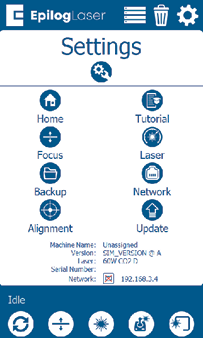
    Einstellungsmenü
  2. Long Press the “Settings” text for 2-3 seconds to enter the Advanced Settings Menu.
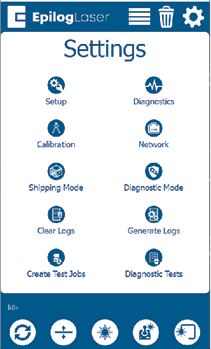
    Menü „Erweiterte Einstellungen“

  1. Click on “Calibration” followed by “Calibrate Cameras” to enter the Camera Calibration menu. If using 1.1.2.8 or older, just tap “Calibrate Cameras”.
  2. Legen Sie ein Stück eloxiertes Aluminium mit den Maßen 200 mm x 125 mm in die obere linke Ecke des Tisches.
  3. Schließen Sie die obere Klappe des Gravierers.
  4. Drücken Sie OK, um die Kalibrierung der Wagenkamera zu starten. Der Gravierer bewegt den Tisch dann auf die für die Kalibrierung geeignete Fokus-Höhe.
  5. Der Gravierer markiert das eloxierte Aluminium mit einem Muster, das die Kamerakabine zur Kalibrierung analysiert. Sobald der Auftrag abgeschlossen ist, sollte eine Erfolgsmeldung erscheinen.
  6. Befolgen Sie die Anweisungen auf dem Bildschirm, um mit der Kalibrierung der Überkopfkamera fortzufahren.
[hilfreich]
  • Datum:
    08/10/2026

Setzen Sie Ihre Laser-Reise fort

Wiederhole eine vergangene Lektion oder gehe weiter, um zu erfahren, was als Nächstes kommt.
/* === Aggressive removal of PrintFriendly injected header elements === */ #printfriendly #pf-title, #printfriendly #pf-src, #printfriendly .pf-header, #printfriendly header, #printfriendly .printfriendly-header, #printfriendly h1:first-of-type, #printfriendly .page-header, #printfriendly [class*="header"], #printfriendly [id*="header"] { display: none !important; visibility: hidden !important; height: 0 !important; margin: 0 !important; padding: 0 !important; } /* Hide any top bar or source URL container */ #printfriendly #pf-src, #printfriendly .pf-src, #printfriendly [class*="src"], #printfriendly [class*="url"] { display: none !important; } /* Force page margins and centered page numbers */ @page { size: letter portrait; margin: 0.7in 0.5in; } @page :left, @page :right { @top-left { content: none !important; } @top-center { content: none !important; } @top-right { content: none !important; } @bottom-center { content: counter(page); font-size: 0.95em; padding-bottom: 25px; } }