Zum Hauptinhalt springen
Systemsteuerung
19000

Filter


Erste Schritte (8)
Usage and Operation (9)
Service and Repair (12)
Handbuch (62)

Bearbeiten der Auftragseinstellungen an der Maschine

Einführung
  1. Print a job to the Ascent.
  2. Long press on the job and the Speed and Power values will come up.
  3. Press the job again and the Speed and Power boxes will come up at the bottom of the screen.
  4. Highlight the one you want to change and another dialog box will come up at the bottom of the screen.
  5. Delete the number in the box and then insert the new value(s).
  6. Press the Save icon to save the change. If you exit this screen without pressing the Save icon, your changes will not be saved.
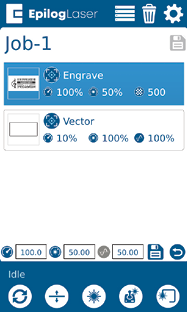
Job-Menü

Geschwindigkeit

Geschwindigkeit

This icon indicates the speed settings on the selected job. It ranges from 1-100%.

Leistung

Leistung

This icon indicates the power settings on the selected job. It ranges from 1-100%.

Frequency

Frequency

This icon indicates the frequency settings on the selected job. It ranges from 1-100%.

Delete Button

Delete Button

The Delete Button will permanently erase jobs from the Job Menu. To delete a job, select the job in the Job Menu, and then select the Delete Button. A dialog will pop up to confirm that you want to delete the file. Select “Yes” and the file will be removed from the Job Menu.

Nützlicher Hinweis:

If you have marked a job as “Saved” and delete the file, it will still be erased from the Job Menu.
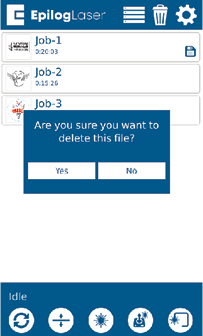
Job Menu - Delete
[hilfreich]
  • Datum:
    07/29/2026

Setzen Sie Ihre Laser-Reise fort

Wiederhole eine vergangene Lektion oder gehe weiter, um zu erfahren, was als Nächstes kommt.
/* === Aggressive removal of PrintFriendly injected header elements === */ #printfriendly #pf-title, #printfriendly #pf-src, #printfriendly .pf-header, #printfriendly header, #printfriendly .printfriendly-header, #printfriendly h1:first-of-type, #printfriendly .page-header, #printfriendly [class*="header"], #printfriendly [id*="header"] { display: none !important; visibility: hidden !important; height: 0 !important; margin: 0 !important; padding: 0 !important; } /* Hide any top bar or source URL container */ #printfriendly #pf-src, #printfriendly .pf-src, #printfriendly [class*="src"], #printfriendly [class*="url"] { display: none !important; } /* Force page margins and centered page numbers */ @page { size: letter portrait; margin: 0.7in 0.5in; } @page :left, @page :right { @top-left { content: none !important; } @top-center { content: none !important; } @top-right { content: none !important; } @bottom-center { content: counter(page); font-size: 0.95em; padding-bottom: 25px; } }