Diese Anleitung führt Sie durch die Konfiguration Ihrer Netzwerkeinstellungen, den Verbindungsaufbau und die Installation der Steuerungssoftware für Ihr Epilog Laser . Bitte wählen Sie unten Ihren Maschinentyp aus, um zu beginnen.
Verbindungsaufbau
Schritt 1: Wählen Sie Ihr Lasersystem aus
Welches Epilog Laser konfigurieren Sie?
Altsysteme
Lasersysteme älterer Generation.
- Mini / Helix Fibermark
- EXT
- Zing
- Original Fusion / M2
Moderne Systeme
Lasersysteme der aktuellen Generation.
- Hersteller
- Kante
- Pro
- Galvo
- Aufstieg
Schritt 2: Netzwerkkonfiguration (TCP/IP)
Zunächst müssen Sie Ihren Laser über ein Ethernet-Kabel an Ihren Computer anschließen und sicherstellen, dass das Gerät eingeschaltet ist. Ihr Computer benötigt eine statische IP-Adresse, um mit dem Laser zu kommunizieren.
Welches Betriebssystem verwenden Sie?
Windows -Einrichtung: Netzwerkcenter
Öffnen Sie das Netzwerk- und Freigabecenter über die Systemsteuerung.

Windows 10-Einrichtung: Adaptereinstellungen
Klicken Sie auf „Adaptereinstellungen ändern“.

Windows -Einrichtung: Verbindungseigenschaften
Klicken Sie mit der rechten Maustaste auf „LAN-Verbindung “ (oder die Verbindung mit der Bezeichnung „Nicht identifiziertes Netzwerk“) und wählen Sie „Eigenschaften“.

Windows -Einrichtung: IPv4-Einstellungen
Wählen Sie „Internetprotokoll Version 4 (TCP/IPv4) “ aus und klicken Sie auf „Eigenschaften“.

Windows 10-Einrichtung: IP-Adresse zuweisen und speichern
Wählen Sie „Folgende IP-Adresse verwenden“ und geben Sie 192.168.3.3 als IP-Adresse ein.
Stellen Sie die Subnetzmaske auf 255.255.255.0 ein und klicken Sie dann auf „OK“, um die Einstellungen zu speichern.

Windows 11-Einrichtung: „Einstellungen“ öffnen
Geben Sie in der Suchleiste am unteren Bildschirmrand „Einstellungen “ ein und klicken Sie auf „Öffnen“.

Windows 11-Einrichtung: „Einstellungen“ öffnen
Klicken Sie auf „Öffnen“.

Windows -Einrichtung: Netzwerk und Internet
Klicken Sie auf „Netzwerk und Internet“.

Windows -Einrichtung: Erweiterte Einstellungen
Klicken Sie auf „Erweiterte Netzwerkeinstellungen“.

Windows 11-Einrichtung: Adapter auswählen
Wählen Sie den Dropdown-Pfeil neben der Ethernet-Verbindung des Lasers aus.

Windows -Einrichtung: Einstellungen bearbeiten
Klicken Sie neben „Weitere Adaptereinstellungen“ auf „Bearbeiten“.

Windows -Einrichtung: IPv4-Eigenschaften
Wählen Sie „Internetprotokoll Version 4 (TCP/IPv4)“ aus und klicken Sie dann auf „Eigenschaften“.

Windows 11-Einrichtung: IP-Adresse zuweisen und speichern
Wählen Sie „Folgende IP-Adresse verwenden“ und geben Sie 192.168.3.3 als IP-Adresse ein.
Stellen Sie die Subnetzmaske auf 255.255.255.0 ein und klicken Sie dann auf „OK“, um die Einstellungen zu speichern.

Softwareauswahl
Die Netzwerkkonfiguration ist abgeschlossen! Mit welcher Software möchten Sie Ihren Laser verwalten und Aufträge an ihn senden?
Treiberinstallation: Herunterladen & Entpacken
- Besuchen Sie die Seite Epilog Laser Legacy Drivers“ und laden Sie den passenden Treiber für Ihr Gerät herunter.
- Öffnen Sie die heruntergeladene Datei und extrahieren Sie deren Inhalt auf Ihren Computer.
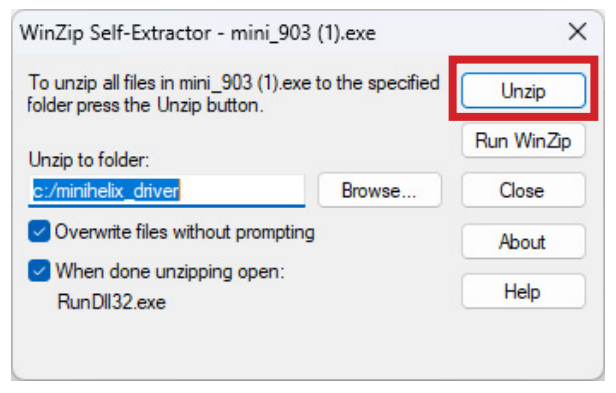
Treiber einrichten: Drucker hinzufügen
Das Fenster „Gerät hinzufügen“ wird geöffnet. Klicken Sie auf „Der gewünschte Drucker ist nicht aufgeführt.“
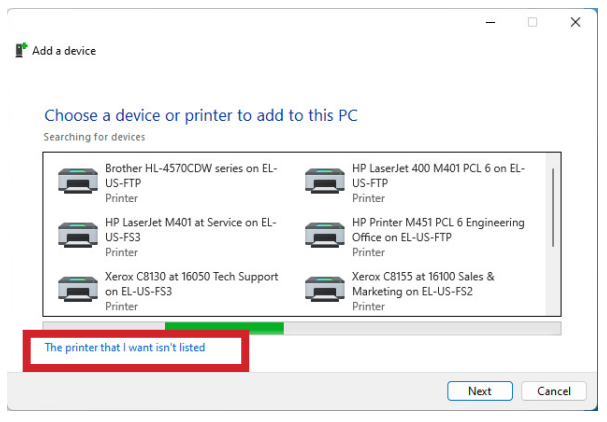
Treiberkonfiguration: Lokalen Drucker hinzufügen
Wählen Sie „Lokalen Drucker oder Netzwerkdrucker mit manuellen Einstellungen hinzufügen “ und klicken Sie auf „Weiter“.
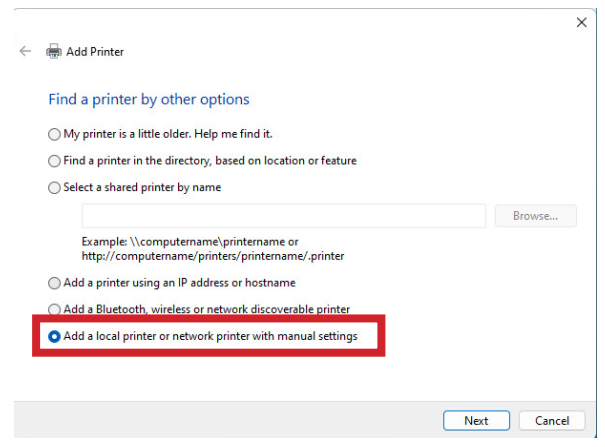
Treiberkonfiguration: Port erstellen
Wählen Sie „Neuen Port erstellen“ und wählen Sie im Dropdown-Menü „Standard-TCP/IP-Port“ aus.
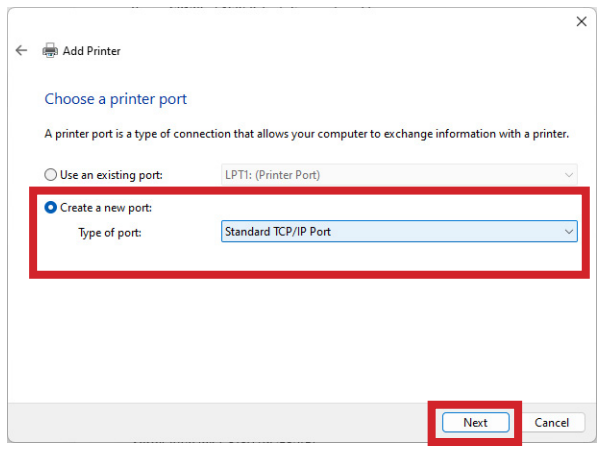
Treiberkonfiguration: Port konfigurieren
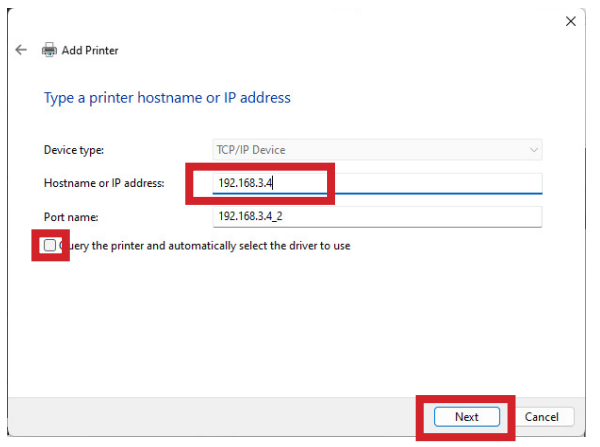
Geben Sie die IP-Adresse Ihres Laserdruckers ein (Standardwert ist 192.168.3.4) und deaktivieren Sie die Option „Drucker abfragen und den zu verwendenden Treiber automatisch auswählen“.
Treiberkonfiguration: Benutzerdefinierte Einstellungen
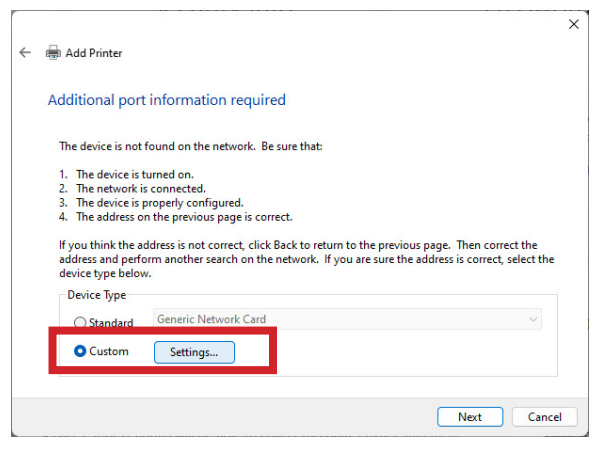
Wählen Sie „Benutzerdefinierte Konfiguration“ aus und klicken Sie auf „Einstellungen“.
Treiberkonfiguration: Port-Einstellungen
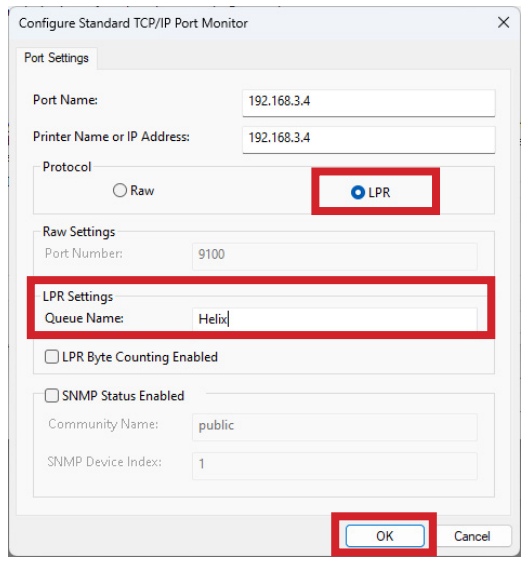
Wählen Sie das LPR -Protokoll aus und geben Sie Ihr Gerätemodell in das Feld „Warteschlangenname“ ein. Klicken Sie auf „OK“ und dann auf „Weiter“.
Treiberinstallation: Treiber installieren
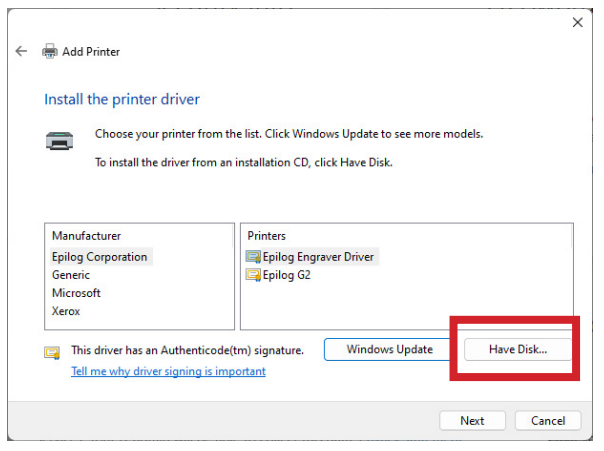
Klicken Sie auf „Datenträger“, navigieren Sie zu den zuvor heruntergeladenen und entpackten Treiberdateien und wählen Sie die .inf-Datei für Ihr Modell aus.
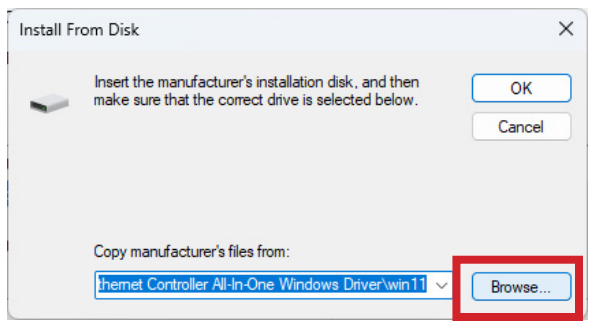
Treiber-Einrichtung: Komplette Einrichtung
Befolgen Sie die weiteren Anweisungen, um Ihren Drucker zu benennen und die Installation abzuschließen.
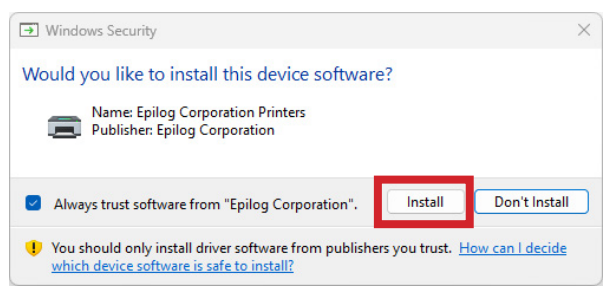
Software-Suite: Installationsstatus
Haben Sie die Epilog Software Suite bereits auf Ihrem Computer installiert?
Software-Installation: Herunterladen
Gehen Sie zu den Seite „Treiber und Firmware“ und klicken Sie dann auf „Software-Suite herunterladen“.
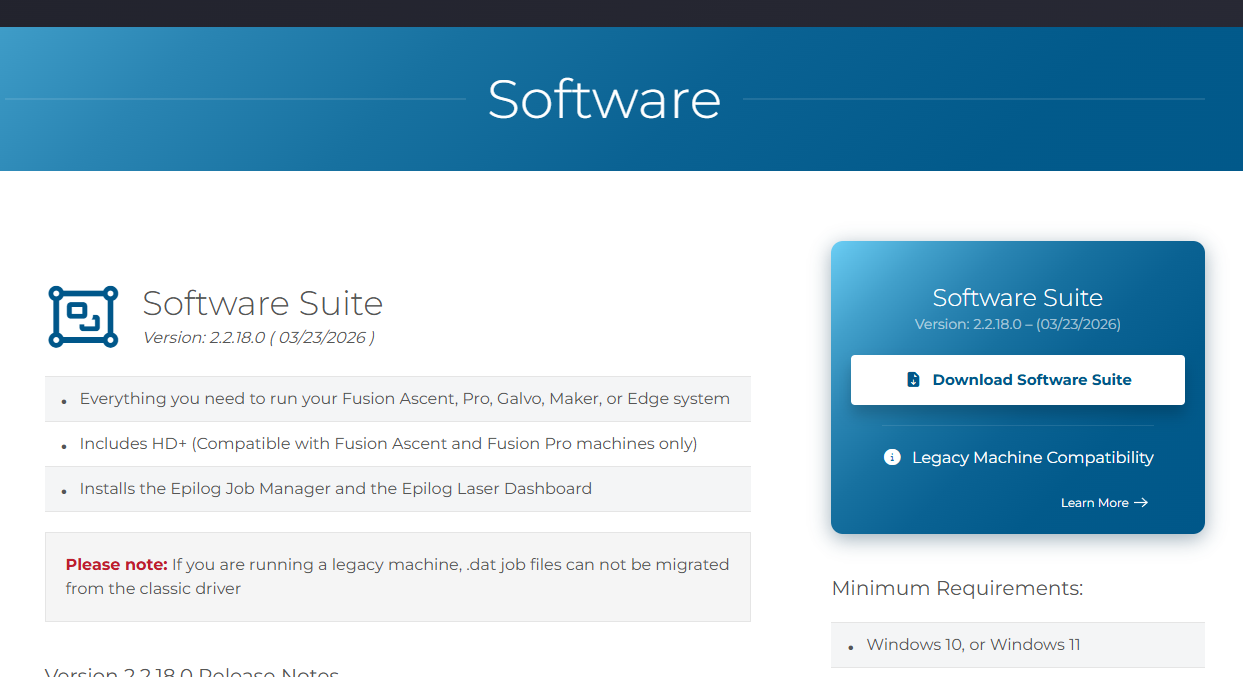
Software-Installation: Entpacken und ausführen
Die Installationsdatei wird als ZIP-Ordner heruntergeladen, der entpackt werden muss. Klicken Sie mit der rechten Maustaste auf den Ordner und wählen Sie „Alle extrahieren“. Sobald der Vorgang abgeschlossen ist, doppelklicken Sie auf die Datei „EpilogSuite“.
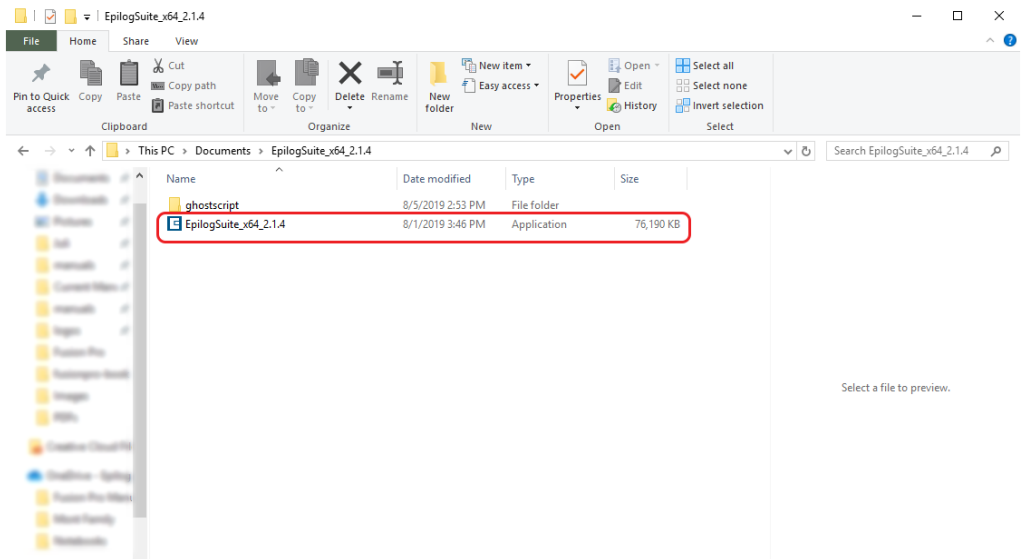
Software-Einrichtung: Willkommen
Es erscheint ein Begrüßungsbildschirm. Klicken Sie auf „Weiter“.
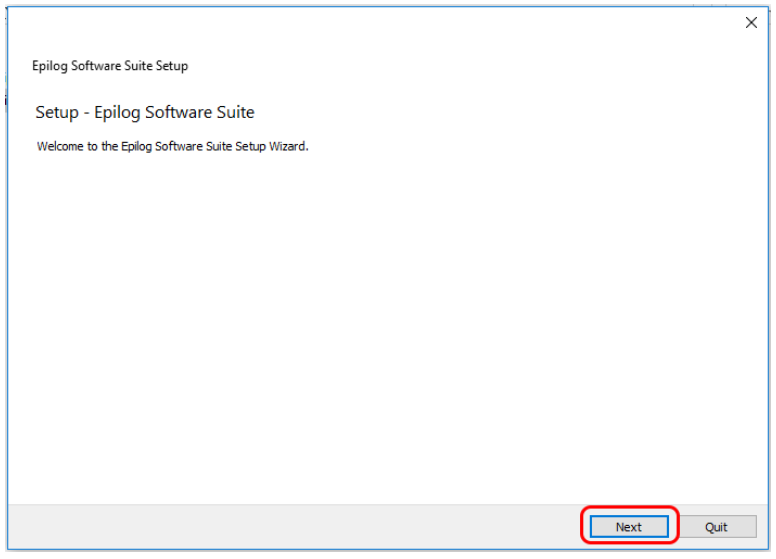
Software-Einrichtung: Verzeichnis auswählen
Wählen Sie die Standardinstallation aus und klicken Sie auf „Weiter“.

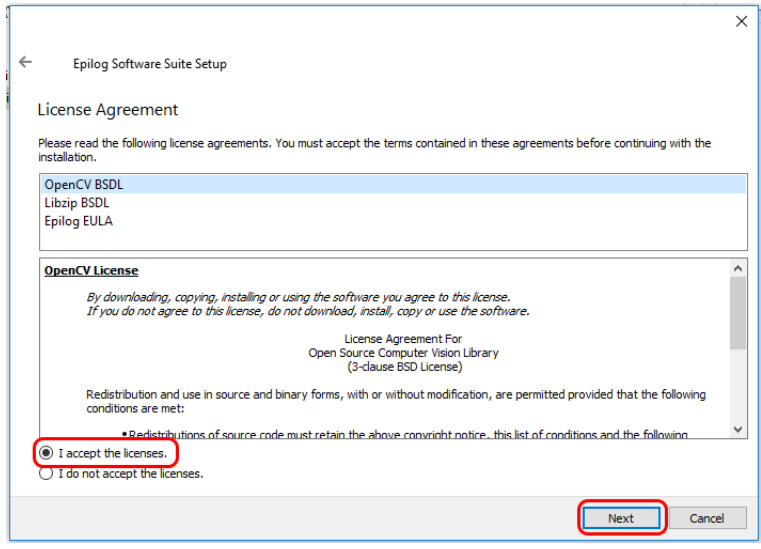
Software-Installation: Lizenzvereinbarung
Lesen und akzeptieren Sie die Lizenzvereinbarungen und klicken Sie auf „Weiter“.
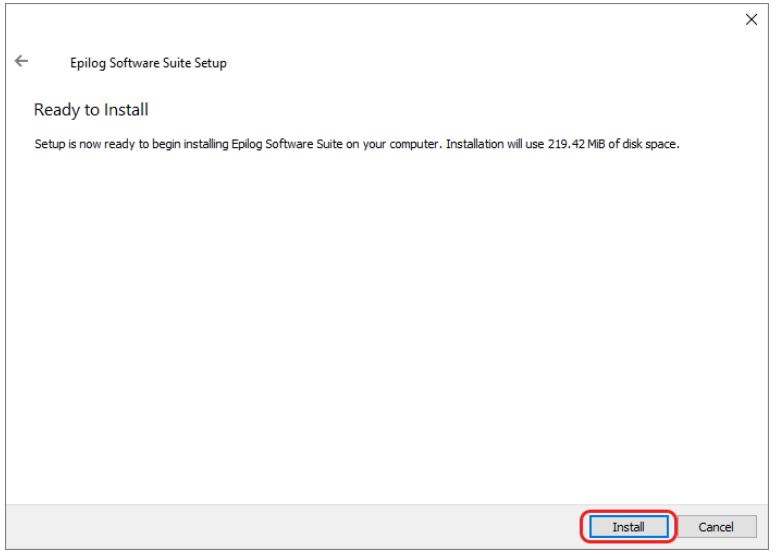
Software-Einrichtung: Bereit zur Installation
Klicken Sie auf „Installieren“, um die Installation zu starten.
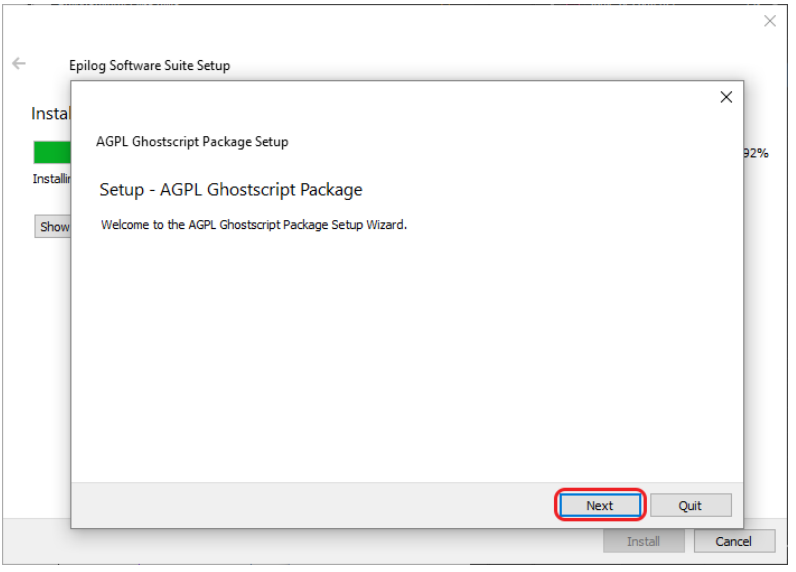
Software-Einrichtung: Ghostscript installieren
Die Installation der Epilog Software Suite wird nun gestartet. Während der Installation erscheint ein Dialogfeld, in dem Sie gefragt werden, ob Sie auch das AGPL-Ghostscript-Paket installieren möchten. Klicken Sie auf „Weiter“.
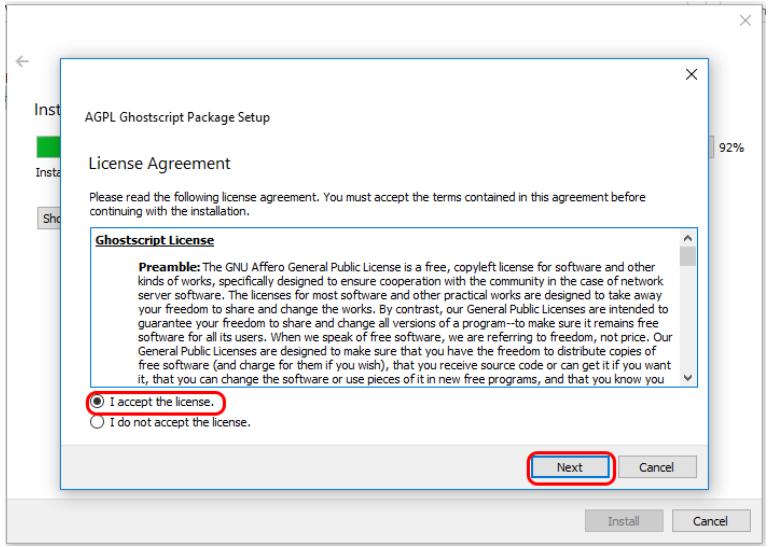
Software-Einrichtung: Ghostscript-Lizenz
Lesen und akzeptieren Sie die AGPL-Lizenzvereinbarung für Ghostscript und klicken Sie anschließend auf „Weiter“.
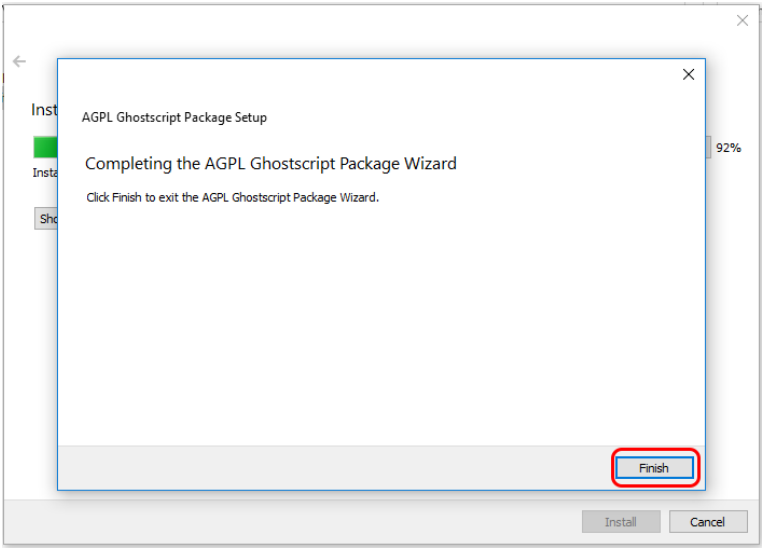
Software-Einrichtung: Ghostscript fertigstellen
Klicken Sie auf „Fertig stellen“, um die Installation von AGPL Ghostscript abzuschließen und die Installation der Epilog Software Suite fortzusetzen.
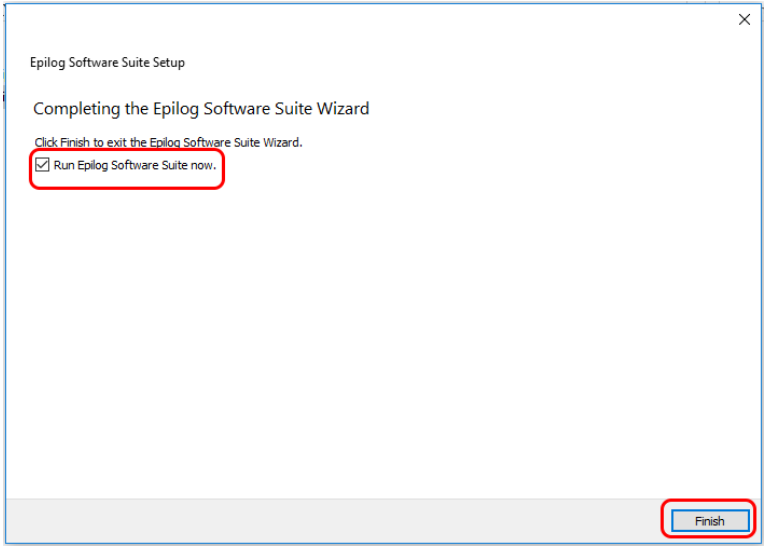
Software-Einrichtung: Installation abschließen
Wählen Sie aus, ob Sie das Programm jetzt ausführen möchten. Klicken Sie auf „Fertig stellen“, um die Installation abzuschließen.
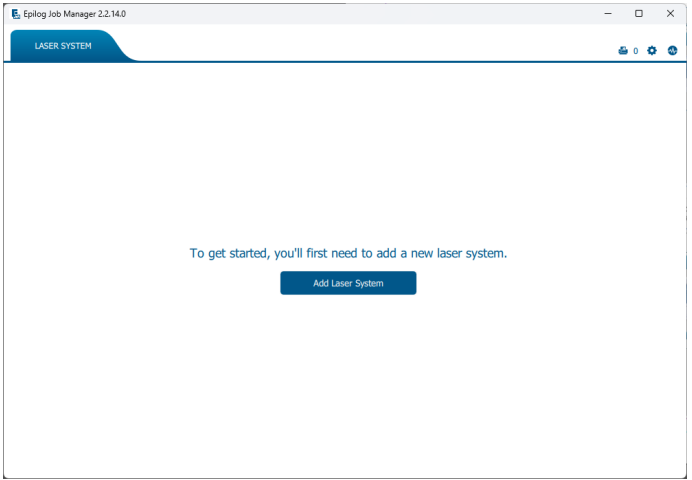
Software-Einrichtung: System hinzufügen
Wenn Sie den Job-Manager zum ersten Mal öffnen, wird dieser Bildschirm angezeigt. Klicken Sie auf „Lasersystem hinzufügen“, um loszulegen.
Software-Einrichtung: Erkennung
Wenn Ihr Gerät eingeschaltet und mit Ihrem Computer verbunden ist, erkennt der Job-Manager es und ermöglicht Ihnen, das Gerät hinzuzufügen. Sie können es auch manuell hinzufügen, indem Sie „Manuell hinzufügen“ auswählen.
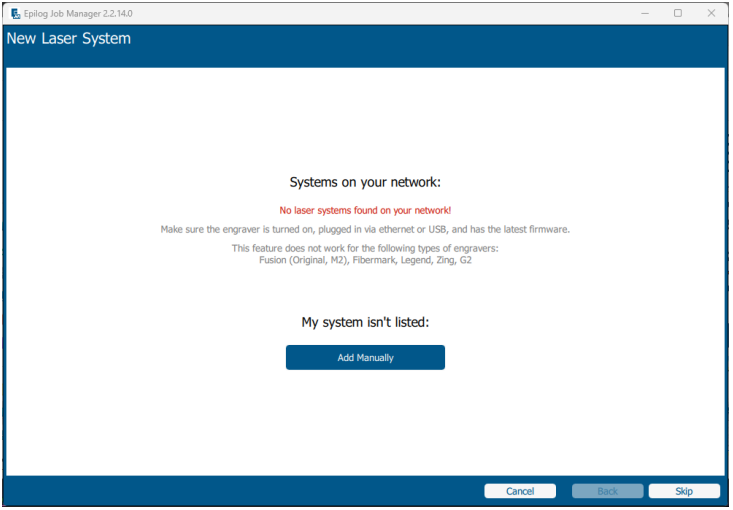
Software-Einrichtung: Konfiguration
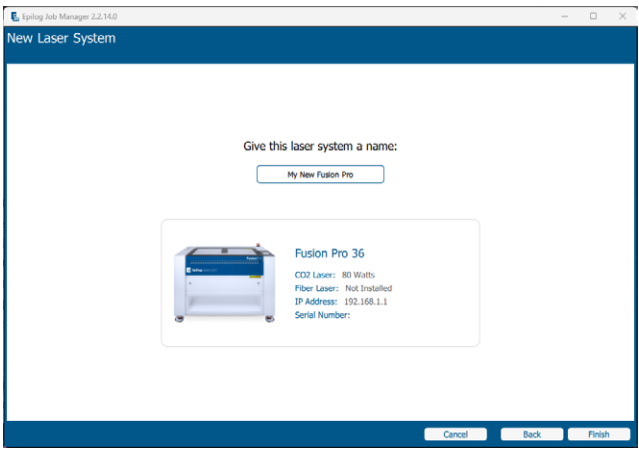
Wählen Sie Ihr Gerät aus der Modellliste aus und nehmen Sie Ihre individuellen Einstellungen vor:
- Modell & Leistung: Wählen Sie Ihr spezifisches Gerät aus.
- IP-Adresse: Geben Sie die zuvor eingerichtete IP-Adresse ein.
- Seriennummer & Name: Geben Sie die Seriennummer Ihres Geräts ein und vergeben Sie einen benutzerdefinierten Namen.
Wenn Sie diese Angaben eingegeben haben, klicken Sie auf „Fertigstellen“.
Software-Einrichtung: Aktivierung
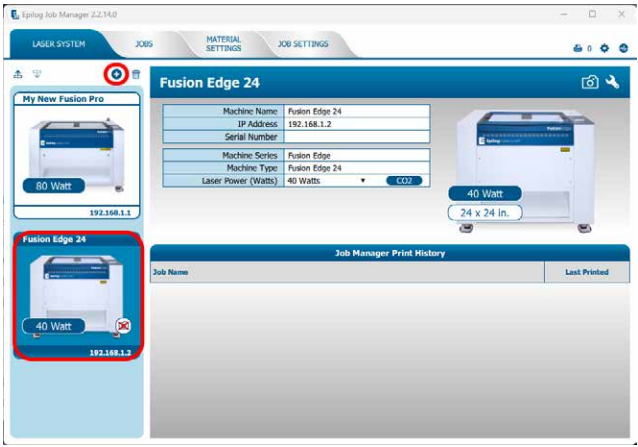
Ihr Laser wurde dem Auftragsmanager hinzugefügt und wird im linken Bereich angezeigt. Er ist nun bereit, Aufträge anzunehmen.
Software-Einrichtung: IP-Adresse eingeben
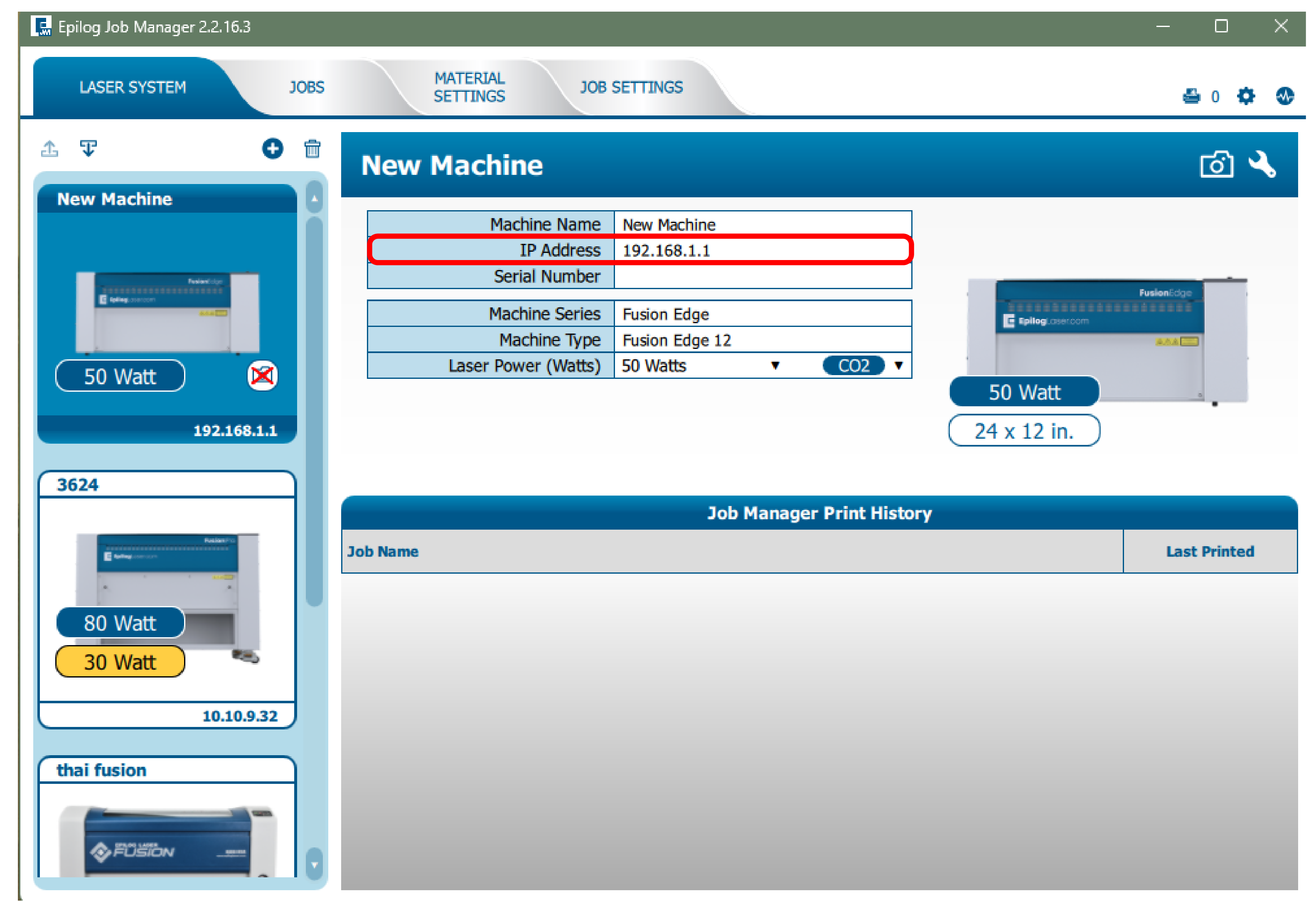
Da die Software-Suite bereits installiert ist, müssen Sie lediglich sicherstellen, dass die IP-Adresse im Job-Manager mit der IP-Adresse übereinstimmt, die Sie dem Laser gerade zugewiesen haben.
Alles bereit!
Herzlichen Glückwunsch! Ihre Software ist nun vollständig konfiguriert.
Tipps zur Fehlerbehebung:
- Überprüfen Sie, ob die IP-Adresse des Lasers mit der übereinstimmt, die bei der Installation des Treibers/der Software eingegeben wurde.
- Stellen Sie sicher, dass das USB-Kabel NICHT angeschlossen ist, wenn Sie Ethernet verwenden.
- Überprüfen Sie Ihr Ethernet-Kabel, falls die Verbindungsprobleme weiterhin bestehen.
- Stellen Sie sicher, dass Ihre Firewall-Einstellungen die Kommunikation mit dem Drucker zulassen.
Schritt 2: Verbindungstyp auswählen
Wie möchten Sie Ihr Lasersystem anschließen?
- USB: Eine direkte, einfache Kabelverbindung zu einem einzelnen Computer.
- Ethernet: Eine kabelgebundene Verbindung (entweder direkt mit einem PC oder über einen Router im lokalen Netzwerk).
- Drahtlos (WLAN): Eine kabellose Verbindung zu Ihrem lokalen WLAN-Netzwerk.
Ethernet-Einrichtung: Verbindungstyp
Wie ist Ihr Ethernet-Kabel verlegt?
- Direkte Verbindung: Der Laser wird direkt an Ihren Computer angeschlossen.
- Netzwerkverbindung: Der Laser ist mit Ihrem lokalen Netzwerk/Router/Switch verbunden.
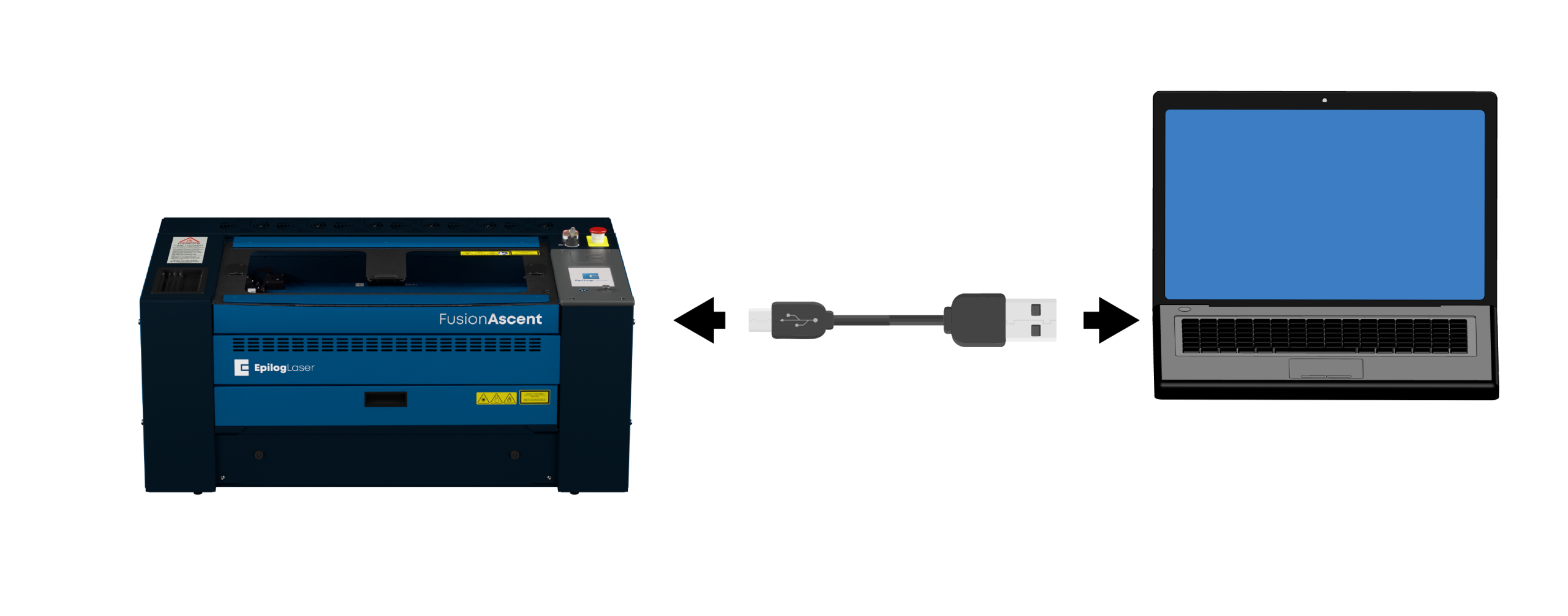
USB-Einrichtung: Stromversorgung & Anschluss
- Schalten Sie das Gerät ein.
- Verbinden Sie den Laser über ein USB-Kabel mit dem Computer.
USB-Einrichtung: Einstellungen
Klicken Sie auf das Zahnrad-Symbol in der oberen rechten Ecke des Anzeigefelds.

USB-Einrichtung: Netzwerkmenü
Netzwerk auswählen.

USB-Einstellungen: USB auswählen
Wählen Sie USB als Verbindungstyp.
Hinweis: Falls diese Option nicht angezeigt wird, müssen Sie möglicherweise auf die Schaltfläche „Bearbeiten“ unten in der Mitte des Bildschirms klicken.

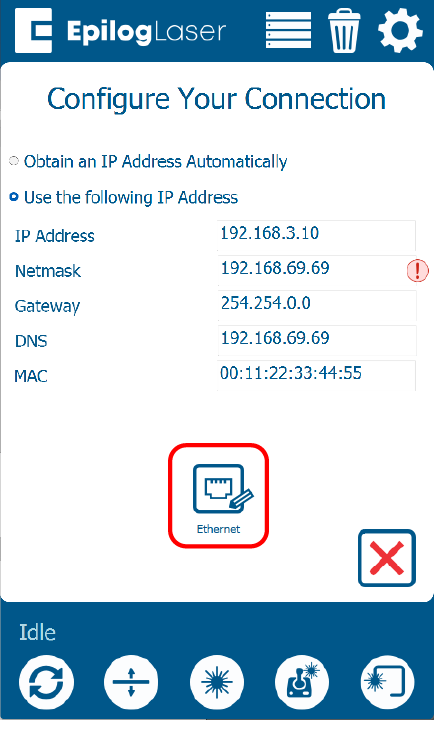
USB-Einrichtung: Standard-IP
Die Standard-IP-Adresse für eine USB-Verbindung lautet 169.254.7.2. Klicken Sie auf den grünen Pfeil, um die Einrichtung abzuschließen.
Hinweis: Dies ist die Standard-IP-Adresse für USB-Verbindungen. Notieren Sie sich die IP-Adresse für die spätere Verwendung bei der Softwareeinrichtung.

USB-Einrichtung: Einrichtung des Geräts abgeschlossen
Ihr Computer und der Laser sind nun so konfiguriert, dass sie über USB kommunizieren.
Drahtlose Einrichtung: Einstellungen
Drahtlose Einrichtung: Einstellungen
Klicken Sie auf das Zahnrad-Symbol in der oberen rechten Ecke des Anzeigefelds.
Einrichtung der WLAN-Verbindung: Netzwerkmenü
Netzwerk auswählen.
WLAN-Einrichtung: WLAN-Menü
Wählen Sie „Drahtlos“.
Hinweis: Falls diese Option nicht angezeigt wird, müssen Sie möglicherweise auf die Schaltfläche „Bearbeiten“ unten in der Mitte des Bildschirms klicken.
WLAN-Einrichtung: Netzwerk auswählen
Wählen Sie Ihr WLAN-Netzwerk aus der Liste aus und klicken Sie dann auf den grünen Pfeil, um fortzufahren.
Hinweis: Wählen Sie dasselbe WLAN-Netzwerk aus, mit dem Ihr Computer verbunden ist.

WLAN-Einrichtung: Sicherheit & Passwort
Wählen Sie das Sicherheitsprotokoll des Netzwerks aus und geben Sie das Passwort ein. Der gängigste Typ ist WPA2 Personal.

WLAN-Einrichtung: IP-Adresse
Wählen Sie „IP-Adresse automatisch beziehen“ und klicken Sie anschließend auf den grünen Pfeil, um die Einrichtung abzuschließen.

Einrichtung der WLAN-Verbindung: Einrichtung des Geräts abgeschlossen
Ihr Laser ist nun für die Kommunikation über Ihr WLAN-Netzwerk konfiguriert.
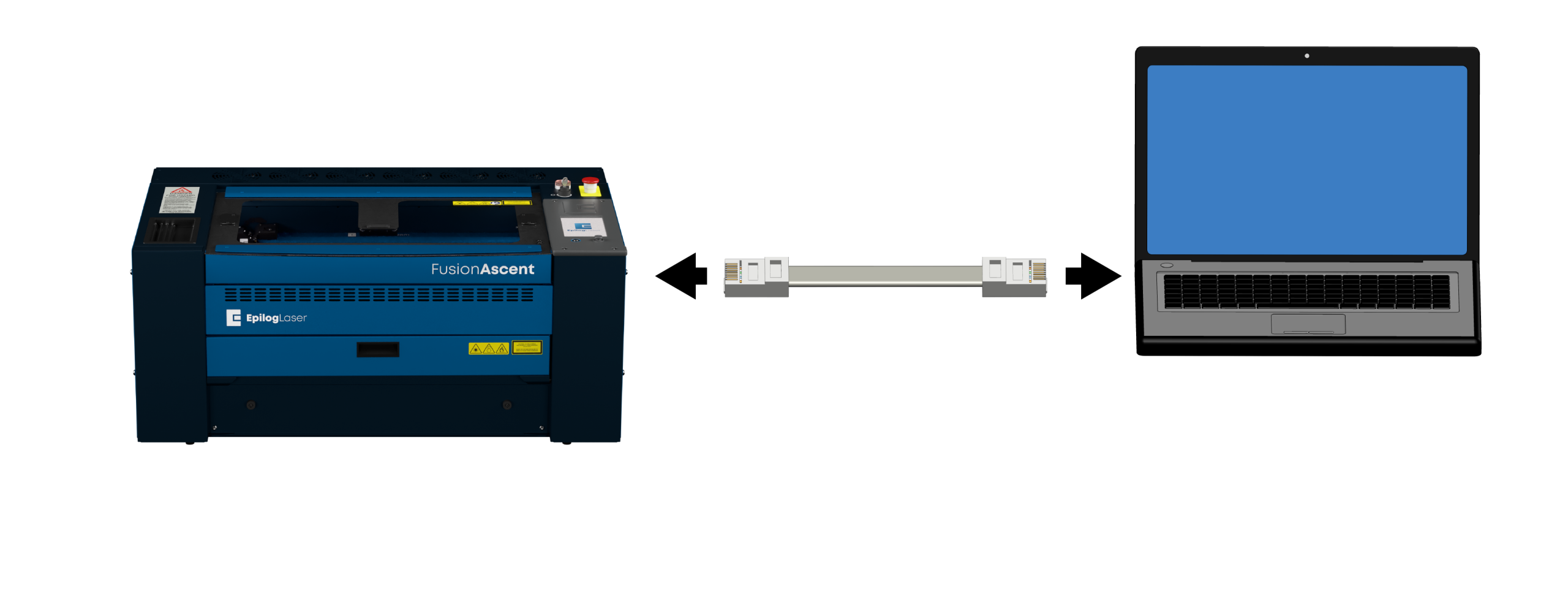
Direkte Einrichtung: Einschalten und anschließen
- Schalten Sie das Gerät ein.
- Verbinden Sie den Laser über ein Ethernet-Kabel mit dem Computer.
Direkte Einrichtung: Einstellungen
Klicken Sie auf das Zahnrad-Symbol in der oberen rechten Ecke des Anzeigefelds.
Direkte Einrichtung: Netzwerkmenü
Netzwerk auswählen.
Direkte Einrichtung: Ethernet-Menü
Wählen Sie Ethernet.
Hinweis: Falls diese Option nicht angezeigt wird, müssen Sie möglicherweise auf die Schaltfläche „Bearbeiten“ unten in der Mitte des Bildschirms klicken.

Direkte Einrichtung: IP-Adresse zuweisen
Wählen Sie „Folgende IP-Adresse verwenden“. Geben Sie im Feld „IP-Adresse“ die Zahl 192.168.3.4 ein. Klicken Sie auf den grünen Pfeil, um die IP-Adresse zu speichern.
Hinweis: Dies ist die Standard-IP-Adresse für direkte Verbindungen. Notieren Sie sich die IP-Adresse für die spätere Verwendung bei der Softwareeinrichtung.

Direkte Einrichtung: TCP/IP-Port konfigurieren
Konfigurieren Sie die TCP/IP-Port-Einstellungen auf Ihrem Computer.
- Die Einrichtung des TCP/IP-Ports ist nur für direkte Verbindungen erforderlich.
- Falls Sie den TCP/IP-Port auf dem Computer noch nicht eingerichtet haben, müssen Sie die folgenden Anweisungen entsprechend Ihrem Betriebssystem befolgen.
Windows -Einrichtung: Netzwerkcenter
Um eine direkte Ethernet-Verbindung zu Ihrem Epilog laser herzustellen, müssen Sie Ihrem Computer eine statische IP-Adresse zuweisen. Die TCP/IP-Portadresse, die Sie auf dem PC einstellen, ist nicht mit der IP-Adresse des Lasers identisch.
Öffnen Sie das Netzwerk- und Freigabecenter über die Systemsteuerung.
Windows 10-Einrichtung: Adaptereinstellungen
Klicken Sie auf „Adaptereinstellungen ändern“.
Windows -Einrichtung: Verbindungseigenschaften
Klicken Sie mit der rechten Maustaste auf „LAN-Verbindung “ (oder die Verbindung mit der Bezeichnung „Nicht identifiziertes Netzwerk“) und wählen Sie „Eigenschaften“.
Windows -Einrichtung: IPv4-Einstellungen
Wählen Sie „Internetprotokoll Version 4 (TCP/IPv4) “ aus und klicken Sie auf „Eigenschaften“.
Windows 10-Einrichtung: IP-Adresse zuweisen und speichern
Wählen Sie „Folgende IP-Adresse verwenden“ und geben Sie 192.168.3.3 als IP-Adresse ein.
Stellen Sie die Subnetzmaske auf 255.255.255.0 ein und klicken Sie dann auf „OK“, um die Einstellungen zu speichern.
Windows 11-Einrichtung: „Einstellungen“ öffnen
Um eine direkte Ethernet-Verbindung zu Ihrem Epilog laser herzustellen, müssen Sie Ihrem Computer eine statische IP-Adresse zuweisen. Die TCP/IP-Portadresse, die Sie auf dem PC einstellen, ist nicht mit der IP-Adresse des Lasers identisch.
Geben Sie in der Suchleiste am unteren Bildschirmrand „Einstellungen“ ein.
Windows 11-Einrichtung: „Einstellungen“ öffnen
Klicken Sie auf „Öffnen“.
Windows -Einrichtung: Netzwerk und Internet
Klicken Sie auf „Netzwerk und Internet“.
Windows -Einrichtung: Erweiterte Einstellungen
Klicken Sie auf „Erweiterte Netzwerkeinstellungen“.
Windows 11-Einrichtung: Adapter auswählen
Wählen Sie den Dropdown-Pfeil neben der Ethernet-Verbindung des Lasers aus.
Windows -Einrichtung: Einstellungen bearbeiten
Klicken Sie neben „Weitere Adaptereinstellungen“ auf „Bearbeiten“.
Windows -Einrichtung: IPv4-Eigenschaften
Wählen Sie „Internetprotokoll Version 4 (TCP/IPv4)“ aus und klicken Sie dann auf „Eigenschaften“.
Windows 11-Einrichtung: IP-Adresse zuweisen und speichern
Wählen Sie „Folgende IP-Adresse verwenden“ und geben Sie 192.168.3.3 als IP-Adresse ein.
Stellen Sie die Subnetzmaske auf 255.255.255.0 ein und klicken Sie dann auf „OK“, um die Einstellungen zu speichern.
Direkte Einrichtung: Verbindung hergestellt
Ihr Computer und der Laser sind nun so konfiguriert, dass sie direkt miteinander kommunizieren können.
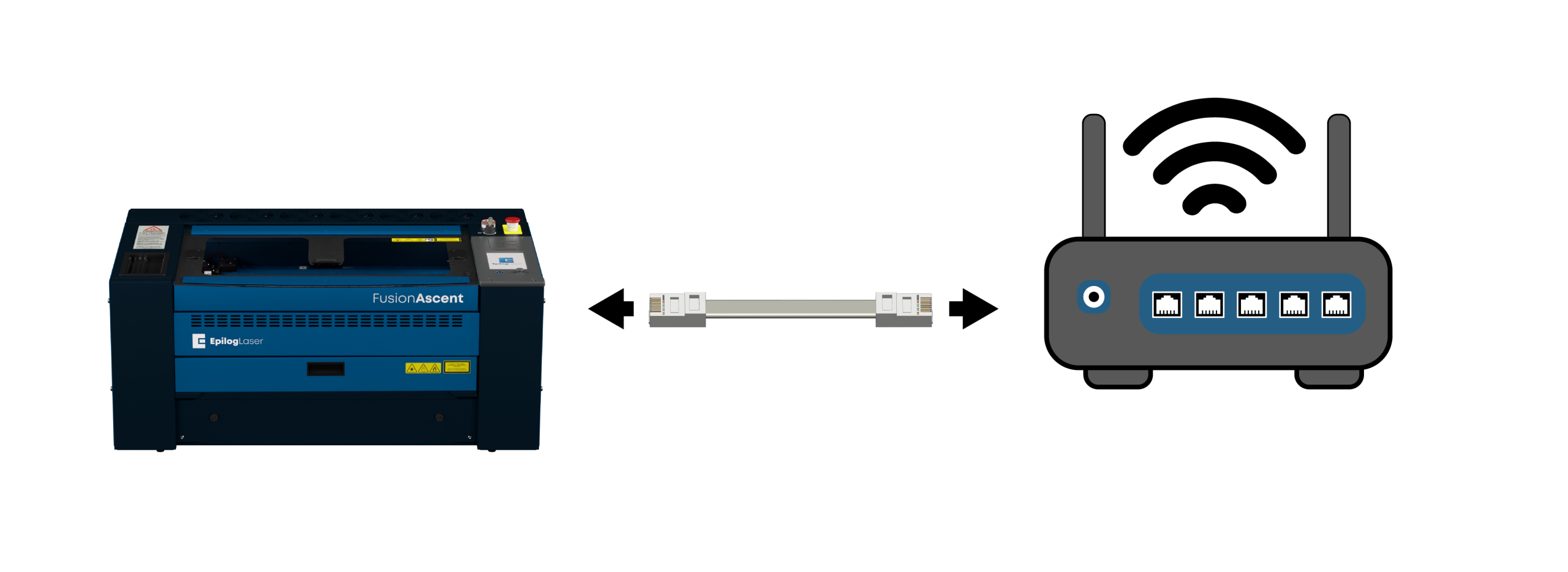
Netzwerkeinrichtung: Kabel anschließen
Verbinden Sie den Laser über ein Ethernet-Kabel mit dem Netzwerk (Router oder Switch).
Netzwerkeinrichtung: Einstellungen
Klicken Sie auf das Zahnradsymbol in der oberen rechten Ecke des Anzeigefelds am Laser.
Netzwerkeinrichtung: Netzwerkmenü
Netzwerk auswählen.
Netzwerkeinrichtung: Ethernet-Menü
Wählen Sie Ethernet.

Netzwerkeinrichtung: IP-Adresse beziehen
Wählen Sie „IP-Adresse automatisch beziehen“. Klicken Sie auf den grünen Pfeil, um die Einstellungen zu speichern.

Netzwerkeinrichtung: Einrichtung des Geräts abgeschlossen
Die Verbindung zu Ihrer Hardware wurde hergestellt.
Software-Einrichtung: Software auswählen
Die Einrichtung Ihrer Lasermaschine ist abgeschlossen! Nun müssen wir die Software auswählen, mit der Sie Aufträge an den Laser senden möchten.
- Epilog Software Suite: Eine leistungsstarke Desktop-Anwendung, die ausschließlich für Windows entwickelt wurde.
- Pulse App: Eine moderne, browserbasierte Anwendung, die auf jedem Betriebssystem (Mac, Windows, Linux, ChromeOS) mit einem Standard-Webbrowser funktioniert.
Welche Software möchten Sie einrichten?
Software-Einrichtung: Installationsstatus
Haben Sie die Epilog Software Suite bereits auf Ihrem Computer installiert?
Software-Installation: Herunterladen
Gehen Sie zu den Seite „Treiber und Firmware“ und klicken Sie dann auf „Software-Suite herunterladen“.
Software-Installation: Entpacken und ausführen
Die Installationsdatei wird als ZIP-Ordner heruntergeladen, der entpackt werden muss. Klicken Sie mit der rechten Maustaste auf den Ordner und wählen Sie „Alle extrahieren“. Sobald der Vorgang abgeschlossen ist, doppelklicken Sie auf die Datei „EpilogSuite“.
Software-Einrichtung: Willkommen
Es erscheint ein Begrüßungsbildschirm. Klicken Sie auf „Weiter“.
Software-Einrichtung: Verzeichnis auswählen
Wählen Sie die Standardinstallation aus und klicken Sie auf „Weiter“.
Software-Installation: Lizenzvereinbarung
Lesen und akzeptieren Sie die Lizenzvereinbarungen und klicken Sie auf „Weiter“.
Software-Einrichtung: Bereit zur Installation
Klicken Sie auf „Installieren“, um die Installation zu starten.
Software-Einrichtung: Ghostscript installieren
Die Installation der Epilog Software Suite wird nun gestartet. Während der Installation erscheint ein Dialogfeld, in dem Sie gefragt werden, ob Sie auch das AGPL-Ghostscript-Paket installieren möchten. Klicken Sie auf „Weiter“.
Software-Einrichtung: Ghostscript-Lizenz
Lesen und akzeptieren Sie die AGPL-Lizenzvereinbarung für Ghostscript und klicken Sie anschließend auf „Weiter“.
Software-Einrichtung: Ghostscript fertigstellen
Klicken Sie auf „Fertig stellen“, um die Installation von AGPL Ghostscript abzuschließen und die Installation der Epilog Software Suite fortzusetzen.
Software-Einrichtung: Installation abschließen
Wählen Sie aus, ob Sie das Programm jetzt ausführen möchten. Klicken Sie auf „Fertig stellen“, um die Installation abzuschließen.
Software-Einrichtung: System hinzufügen
Wenn Sie den Job-Manager zum ersten Mal öffnen, wird dieser Bildschirm angezeigt. Klicken Sie auf „Lasersystem hinzufügen“, um loszulegen.
Software-Einrichtung: Erkennung
Wenn Ihr Gerät eingeschaltet und mit Ihrem Computer verbunden ist, erkennt der Job-Manager es und ermöglicht Ihnen, das Gerät hinzuzufügen. Sie können es auch manuell hinzufügen, indem Sie „Manuell hinzufügen“ auswählen.
Software-Einrichtung: Konfiguration
Wählen Sie Ihr Gerät aus der Modellliste aus und nehmen Sie Ihre individuellen Einstellungen vor:
- Modell & Leistung: Wählen Sie Ihr spezifisches Gerät aus.
- IP-Adresse: Geben Sie die zuvor eingerichtete IP-Adresse ein.
- Seriennummer & Name: Geben Sie die Seriennummer Ihres Geräts ein und vergeben Sie einen benutzerdefinierten Namen.
Wenn Sie diese Angaben eingegeben haben, klicken Sie auf „Fertigstellen“.
-
Brauchst du Hilfe beim Finden der IP-Adresse?
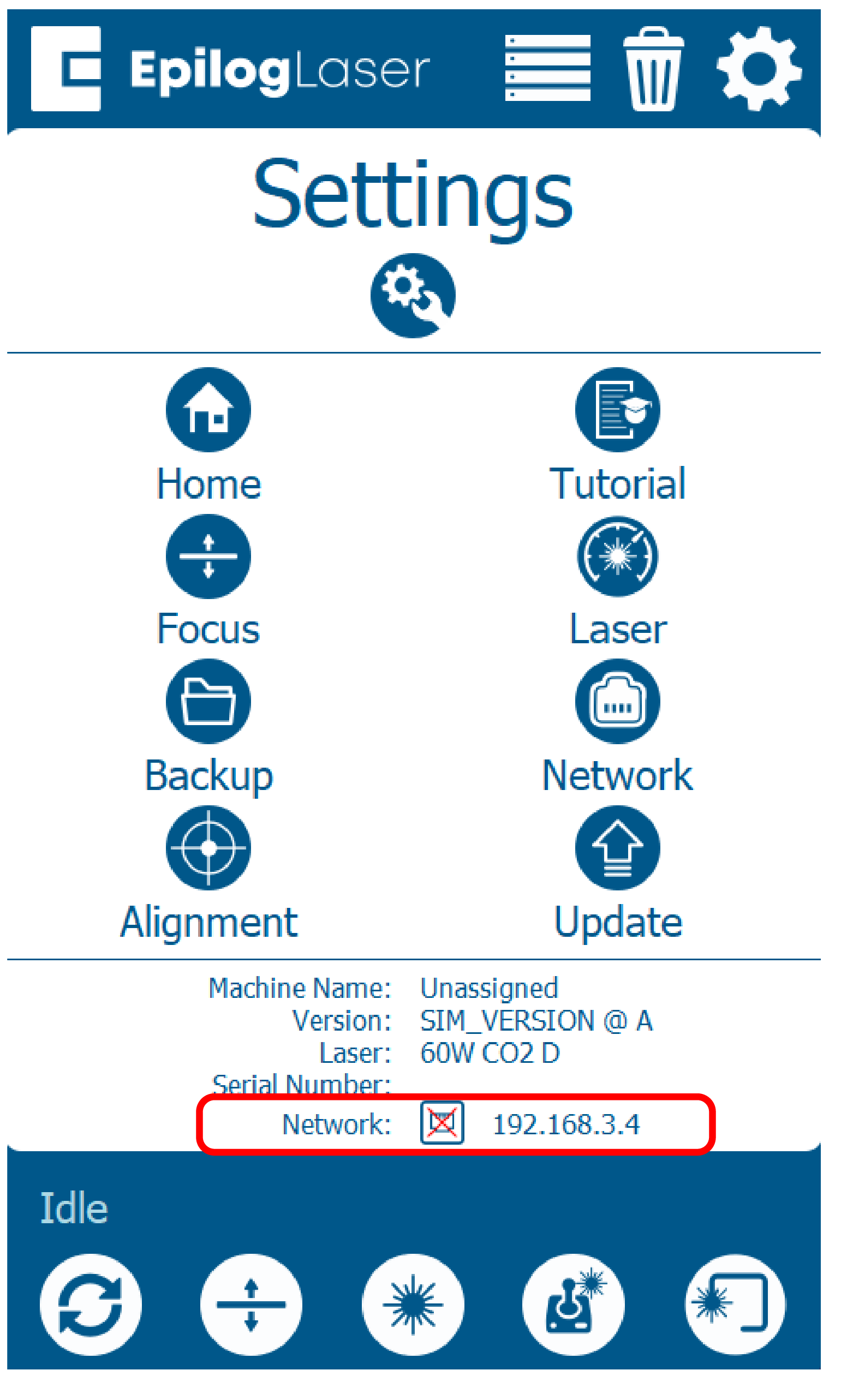
Um die IP-Adresse Ihres Lasers zu ermitteln, rufen Sie das Display des Lasers auf:
- Klicken Sie auf das Zahnrad-Symbol.
- Die aktuelle IP-Adresse wird unten auf dem Bildschirm unter „Netzwerk“ angezeigt :
Software-Einrichtung: Aktivierung
Ihr Laser wurde dem Auftragsmanager hinzugefügt und wird im linken Bereich angezeigt. Er ist nun bereit, Aufträge anzunehmen.
Verwenden Sie die Schaltflächen „Hinzufügen“ oder „Löschen“, um weitere Computer hinzuzufügen oder zu entfernen.
Software-Einrichtung: IP-Adresse eingeben
Da die Software-Suite bereits installiert ist, müssen Sie lediglich sicherstellen, dass die IP-Adresse im Job-Manager mit der IP-Adresse übereinstimmt, die Sie dem Laser gerade zugewiesen haben.
-
Brauchst du Hilfe beim Finden der IP-Adresse?
Um die IP-Adresse Ihres Lasers zu ermitteln, rufen Sie das Display des Lasers auf:
- Klicken Sie auf das Zahnrad-Symbol.
- Die aktuelle IP-Adresse wird unten auf dem Bildschirm unter „Netzwerk“ angezeigt :
Pulse-Einrichtung: Anwendung starten
- Öffnen Sie ein Webbrowser-Fenster.
- Geben Sie in die Adressleiste http:// ein, gefolgt von der IP-Adresse des Lasers. Beispiel: http://192.168.3.4
- Drücken Sie die Eingabetaste.
- Die Pulse App wird in Ihrem Webbrowser-Fenster geladen.
-
Brauchst du Hilfe beim Finden der IP-Adresse?
Um die IP-Adresse Ihres Lasers zu ermitteln, rufen Sie das Display des Lasers auf:
- Klicken Sie auf das Zahnrad-Symbol.
- Die aktuelle IP-Adresse wird unten auf dem Bildschirm unter „Netzwerk“ angezeigt :

Impulseinstellungen: Datei öffnen
- Wählen Sie „Datei öffnen“.
- Wählen Sie eine Datei aus und klicken Sie auf „Öffnen“.


Impuls-Einstellungen: Einstellungen & Senden
- Klicken Sie unter „Prozesse“ in der rechten Spalte auf die Miniaturansicht für „Gravieren/Schneiden“. Stellen Sie Geschwindigkeit und Leistung ein und klicken Sie auf „Fertig“.
- Klicken Sie auf „Senden“.


Impulseinstellungen: Auftrag ausführen
- Vergewissern Sie sich, dass die Datei nun auf dem Display des Lasers angezeigt wird.
- Laden Sie Ihr Material.
- Wählen Sie den Auftrag aus.
- Klicken Sie auf die Wiedergabe-/Pause-Taste am Laser, um den Auftrag auszuführen.
Alles bereit!
Herzlichen Glückwunsch! Ihr Laser und Ihre Software sind nun vollständig konfiguriert.