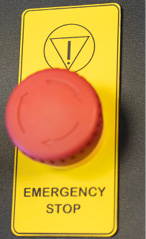
On the top of all Fusion Ascent models, you will see a large, red Emergency Stop Button. If there is an emergency, such as a fire, immediately press the Emergency Stop Button. The laser carriage will immediately stop and the system will shut down.
To reset the system on the Fusion Ascent, you must turn off the system using the Key Switch, then twist the Emergency Stop Button clockwise to release the system, then turn on the laser.
After an emergency stop, a normal stop, or an interruption of the power supply, the laser system will not resume a job automatically. Restarting a job always requires deliberate operator action (pressing Go/Stop).
When power is applied, the system performs a homing sequence to establish axis positions. The worktable first moves downward to locate its home switch and then returns to its previous height, and the carriage moves to its home position. Keep hands clear of the worktable and the carriage when switching the machine on, and never switch the machine on while any part of your body is inside the cabinet.
Nota útil:
If your laser ever stops running and you can’t turn it on, check to see if the Emergency Stop Button has been pressed by accident.
Advertencia:
IF A HAND OR FINGER IS TRAPPED BY THE WORKTABLE:
DO NOT PRESS THE EMERGENCY STOP BUTTON. Doing so removes power to the drive motors, and the worktable CANNOT then be moved until the system has been reset.
- RELEASE THE JOYSTICK. Worktable movement stops.
- PULL THE JOYSTICK DOWNWARD. The worktable moves down and releases.
- IF THE EMERGENCY STOP BUTTON HAS ALREADY BEEN PRESSED, RESET THE SYSTEM FIRST: turn the machine off at the Key Switch, twist the Emergency Stop Button clockwise to release it, then turn the machine back on. The worktable can then be driven down with the joystick.
- SEEK MEDICAL ATTENTION for any crush injury, even where there is no visible wound.