Passer au contenu principal
Panneau de configuration

Filtres


Getting Started (48)
Utilisation et fonctionnement (125)
Entretien et réparation (270)
Manual (66)

Modification des paramètres de travail sur la machine

Introduction
  1. Print a job to the Ascent.
  2. Long press on the job and the Speed and Power values will come up.
  3. Press the job again and the Speed and Power boxes will come up at the bottom of the screen.
  4. Highlight the one you want to change and another dialog box will come up at the bottom of the screen.
  5. Delete the number in the box and then insert the new value(s).
  6. Press the Save icon to save the change. If you exit this screen without pressing the Save icon, your changes will not be saved.
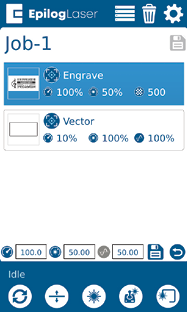
Menu Emploi

Vitesse

Vitesse

This icon indicates the speed settings on the selected job. It ranges from 1-100%.

Puissance

Puissance

This icon indicates the power settings on the selected job. It ranges from 1-100%.

Frequency

Frequency

This icon indicates the frequency settings on the selected job. It ranges from 1-100%.

Bouton « Supprimer »

Bouton « Supprimer »

Le bouton « Supprimer » efface définitivement les tâches du menu des tâches. Pour supprimer une tâche, sélectionnez-la dans le menu des tâches, puis cliquez sur le bouton « Supprimer ». Une boîte de dialogue s'affiche pour vous demander de confirmer la suppression du fichier. Sélectionnez « Oui » et le fichier sera supprimé du menu des tâches.

Remarque utile :

Si vous avez marqué un travail comme « Enregistré » et que vous supprimez le fichier, celui-ci sera tout de même supprimé du menu « Travaux ».
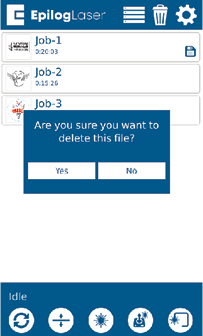
Job Menu - Delete
[utile]
  • Date :
    07/29/2026
/* === Aggressive removal of PrintFriendly injected header elements === */ #printfriendly #pf-title, #printfriendly #pf-src, #printfriendly .pf-header, #printfriendly header, #printfriendly .printfriendly-header, #printfriendly h1:first-of-type, #printfriendly .page-header, #printfriendly [class*="header"], #printfriendly [id*="header"] { display: none !important; visibility: hidden !important; height: 0 !important; margin: 0 !important; padding: 0 !important; } /* Hide any top bar or source URL container */ #printfriendly #pf-src, #printfriendly .pf-src, #printfriendly [class*="src"], #printfriendly [class*="url"] { display: none !important; } /* Force page margins and centered page numbers */ @page { size: letter portrait; margin: 0.7in 0.5in; } @page :left, @page :right { @top-left { content: none !important; } @top-center { content: none !important; } @top-right { content: none !important; } @bottom-center { content: counter(page); font-size: 0.95em; padding-bottom: 25px; } }