Passer au contenu principal
Pour commencer
19000

Filtres


Pour commencer (8)
Utilisation et fonctionnement (9)
Entretien et réparation (12)
Manuel (62)

Installez la suite logicielle et configurez votre laser

Introduction

Suivez les instructions pour la suite de la configuration. Pour obtenir des instructions plus détaillées sur l'installation de la suite logicielle ou la configuration de votre machine dans le Gestionnaire de tâches, rendez-vous sur support.epiloglaser.com et recherchez notre « Guide de connexion interactif ».
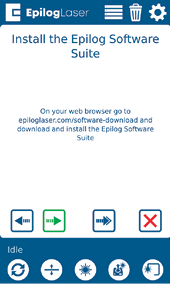
Instructions d'installation de la suite logicielle
[utile]
  • Date :
    07/27/2026

Poursuivez votre parcours laser

Revoyez une leçon précédente ou passez à la suivante pour découvrir la suite.
/* === Aggressive removal of PrintFriendly injected header elements === */ #printfriendly #pf-title, #printfriendly #pf-src, #printfriendly .pf-header, #printfriendly header, #printfriendly .printfriendly-header, #printfriendly h1:first-of-type, #printfriendly .page-header, #printfriendly [class*="header"], #printfriendly [id*="header"] { display: none !important; visibility: hidden !important; height: 0 !important; margin: 0 !important; padding: 0 !important; } /* Hide any top bar or source URL container */ #printfriendly #pf-src, #printfriendly .pf-src, #printfriendly [class*="src"], #printfriendly [class*="url"] { display: none !important; } /* Force page margins and centered page numbers */ @page { size: letter portrait; margin: 0.7in 0.5in; } @page :left, @page :right { @top-left { content: none !important; } @top-center { content: none !important; } @top-right { content: none !important; } @bottom-center { content: counter(page); font-size: 0.95em; padding-bottom: 25px; } }