Passer au contenu principal

Utilisation et fonctionnement

Série : 9000

Filtres


Pour commencer (1)
Utilisation et fonctionnement (88)
Entretien et réparation (29)
Manuel (0)

Results: 88 items found
  • Afficher :
Trier par
Pertinence

Filtres


Pour commencer (1)
Utilisation et fonctionnement (88)
Entretien et réparation (29)
Manuel (0)

Gravure centre-centre vs gravure centre personnalisée

Découvrez le positionnement prédéfini pour centrer votre illustration, ainsi que les techniques permettant de centrer les graphiques décalés.

Using Center-Center   There are many ways to use Center Engraving on the Epilog Laser Dashboard.   Let’s take a logo we want to engrave at the center of a coaster. In the Epilog Dashboard, choose the Advanced Tab.   Next to Centering Point you’ll see a list of all (...)
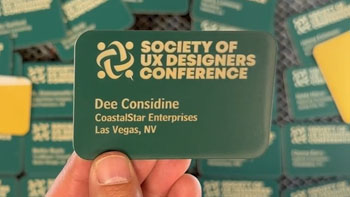
Utilisez la fusion d'impression pour personnaliser plusieurs éléments

Apprenez à utiliser la fonctionnalité de fusion d'impression dans CorelDRAW distinguer et graver facilement plusieurs éléments à la fois.

Import Data Here we have a series of name badges to engrave and cut on the laser using print merge. First we’ll need to pull in the list of names.   Select File > Print Merge > Create/Load Print Merge Click Import File and navigate to your .csv, .rtf, or (...)
Utilisation de l'option de gravure ascendante dans le Laser Dashboard

Quand et comment utiliser l'option de gravure ascendante qui apparaît dans le pilote d'impression ?

As any engraver knows, most materials you engrave or cut can produce a certain amount of debris. This is especially true with woods, acrylics and plastics. Epilog’s Laser Dashboard™ features an array of engraving options to help you get the most from you system. The Bottom-Up engraving feature is one (...)