Ga naar de hoofdinhoud
Kalibratie

Filters


Getting Started (48)
Gebruik en bediening (125)
Onderhoud en reparatie (270)
Manual (66)

Kalibratie van de camera in de wagen

Inleiding

The following procedure must be performed first for all Fusion Ascent machines. Turn on the engraver, and let it complete the startup process.

  1. On the display, press the gear icon to enter the Settings Menu.
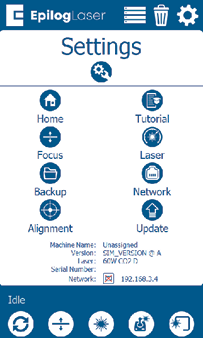
    Instellingenmenu
  2. Long Press the “Settings” text for 2-3 seconds to enter the Advanced Settings Menu.
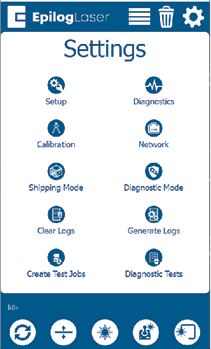
    Menu Geavanceerde instellingen

  1. Click on “Calibration” followed by “Calibrate Cameras” to enter the Camera Calibration menu. If using 1.1.2.8 or older, just tap “Calibrate Cameras”.
  2. Leg een stuk geanodiseerd aluminium van 200 mm x 125 mm in de linkerbovenhoek van de tafel.
  3. Sluit de bovenste deur van de graveermachine.
  4. Druk op OK om de kalibratie van de camera te starten. De graveermachine verplaatst dan de tafel naar de juiste brandpuntshoogte voor kalibratie.
  5. De graveur zet een patroon op het geanodiseerde aluminium dat de camera op de wagen bekijkt om te kijken of alles goed is. Als het klaar is, zie je een bericht dat het gelukt is.
  6. Volg de instructies op het scherm om door te gaan naar het kalibreren van de camera boven je hoofd.
[handig]
  • Datum:
    08/10/2026
/* === Aggressive removal of PrintFriendly injected header elements === */ #printfriendly #pf-title, #printfriendly #pf-src, #printfriendly .pf-header, #printfriendly header, #printfriendly .printfriendly-header, #printfriendly h1:first-of-type, #printfriendly .page-header, #printfriendly [class*="header"], #printfriendly [id*="header"] { display: none !important; visibility: hidden !important; height: 0 !important; margin: 0 !important; padding: 0 !important; } /* Hide any top bar or source URL container */ #printfriendly #pf-src, #printfriendly .pf-src, #printfriendly [class*="src"], #printfriendly [class*="url"] { display: none !important; } /* Force page margins and centered page numbers */ @page { size: letter portrait; margin: 0.7in 0.5in; } @page :left, @page :right { @top-left { content: none !important; } @top-center { content: none !important; } @top-right { content: none !important; } @bottom-center { content: counter(page); font-size: 0.95em; padding-bottom: 25px; } }