Ga naar de hoofdinhoud
Configuratiescherm

Filters


Getting Started (48)
Gebruik en bediening (125)
Onderhoud en reparatie (270)
Manual (66)

Focus-menu

Inleiding

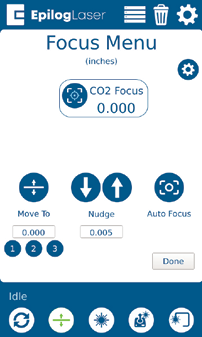
To access the Focus Menu press the Focus key, which turns green when active. The Focus Menu is used for raising or lowering the table level to focus the laser precisely to your engraving or cutting material using the Focus Gauge. The height of the table is adjustable by either using the Joystick, or using the Nudge arrows. Once you are finished using the Focus Menu, press the Focus key again to return to the main Job menu.

Move To

Enter an amount to focus the table to the laser at a specific height.

Nudge

The nudge arrows allow you to fine-tune the position of the laser down to a thousandth of an inch. To change the increments you want to nudge the laser’s position, click the text box under “Nudge” and enter an amount.
Focus-menu

Automatische scherpstelling

When you have jogged the lens carriage above your material, press the Auto Focus button to use the plunger Auto Focus. The table will rise until the material touches the plunger, then set the table to the correct height. Your job should now be in focus.

Instellingen

Pressing the gear icon on the Focus menu allows you to save “Thickness Presets” which can be useful for items you work with regularly that have a consistent thickness. Simply type in the table height you wish to use and save the presets by pressing the save icon. Now when you press the numbers 1, 2, or 3 on the focus menu, and then press “Move To”, your machine will adjust the table to that height.

[handig]
  • Datum:
    07/28/2026
/* === Aggressive removal of PrintFriendly injected header elements === */ #printfriendly #pf-title, #printfriendly #pf-src, #printfriendly .pf-header, #printfriendly header, #printfriendly .printfriendly-header, #printfriendly h1:first-of-type, #printfriendly .page-header, #printfriendly [class*="header"], #printfriendly [id*="header"] { display: none !important; visibility: hidden !important; height: 0 !important; margin: 0 !important; padding: 0 !important; } /* Hide any top bar or source URL container */ #printfriendly #pf-src, #printfriendly .pf-src, #printfriendly [class*="src"], #printfriendly [class*="url"] { display: none !important; } /* Force page margins and centered page numbers */ @page { size: letter portrait; margin: 0.7in 0.5in; } @page :left, @page :right { @top-left { content: none !important; } @top-center { content: none !important; } @top-right { content: none !important; } @bottom-center { content: counter(page); font-size: 0.95em; padding-bottom: 25px; } }