Ga naar de hoofdinhoud
Configuratiescherm
19000

Filters


Getting Started (8)
Usage and Operation (9)
Service and Repair (12)
Handleiding (62)

Parkeerpositie instellen / Parkeerpositie resetten

Inleiding
  1. To set a new Park Position, press the Settings gear button in the upper right corner.
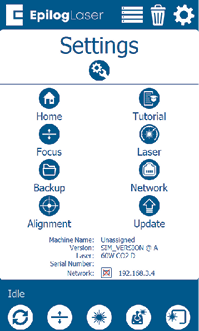
    Instellingenmenu
  2. Under the Settings menu, press the wrench and gear icon in the bottom left corner to open the Config Settings Menu.
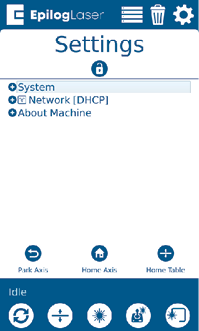
    Park Position Settings
  3. Press “System” to expand the menu. Scroll down to “Park Position” and press it to open the submenu.
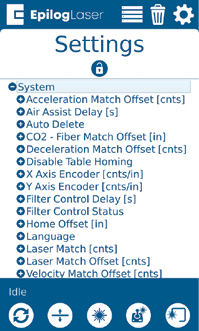
    Park Position Menu
  4. Scroll down to “Park Position” and press it to open up the submenu.
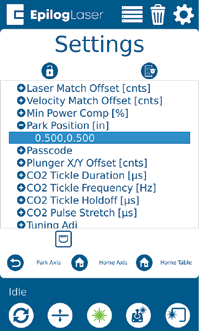
    Park Position Menu
  5. Tap the current number value below Park Position to change it to the X & Y coordinates of your choice. Press “Ok” to save the new coordinates.
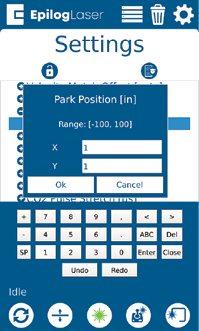
    Set Park Position Coordinates
  6. To reset Park Position to its default position, follow the previous steps and change both the X & Y value to “1”.

[handig]
  • Datum:
    08/10/2026

Ga verder met je laseravontuur

Bekijk een eerdere les nog eens of ga verder om te ontdekken wat er daarna komt.
/* === Aggressive removal of PrintFriendly injected header elements === */ #printfriendly #pf-title, #printfriendly #pf-src, #printfriendly .pf-header, #printfriendly header, #printfriendly .printfriendly-header, #printfriendly h1:first-of-type, #printfriendly .page-header, #printfriendly [class*="header"], #printfriendly [id*="header"] { display: none !important; visibility: hidden !important; height: 0 !important; margin: 0 !important; padding: 0 !important; } /* Hide any top bar or source URL container */ #printfriendly #pf-src, #printfriendly .pf-src, #printfriendly [class*="src"], #printfriendly [class*="url"] { display: none !important; } /* Force page margins and centered page numbers */ @page { size: letter portrait; margin: 0.7in 0.5in; } @page :left, @page :right { @top-left { content: none !important; } @top-center { content: none !important; } @top-right { content: none !important; } @bottom-center { content: counter(page); font-size: 0.95em; padding-bottom: 25px; } }