メインコンテンツへスキップ
コントロールパネル

フィルター


Getting Started (48)
使用方法および操作 (125)
サービスおよび修理 (270)
Manual (66)

設定メニュー

はじめに

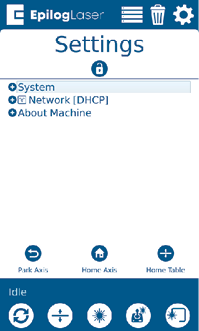
「設定」メニューには、「システム」、「ネットワーク」、「マシン情報」の3つのサブメニューがあります。

システム

「システム設定」を選択すると、本機の詳細情報が表示されます。これらは工場出荷時の設定であり、Epilogテクニカルサポートからの指示がない限り、変更しないでください。

ネットワーク

「ネットワーク設定」を選択すると、IPアドレスとネットマスクを変更できます。この画面に表示されるIPアドレスは、ジョブマネージャーでこのマシンに割り当てたIPアドレスと一致している必要があります。マシンを複数台使用している場合は、各マシンに個別のIPアドレスを割り当てる必要があります。

マシンについて

このセクションを選択すると、お使いのレーザーのファームウェアバージョン、レーザー出力、およびシリアル番号に関する情報が表示されます。

パーク・アクシス

「Park Axis」ボタンを押すと、レーザーがホームポジションに戻ります。
パーク・アクシス
[参考になる]
  • 日付:
    07/30/2026
/* === Aggressive removal of PrintFriendly injected header elements === */ #printfriendly #pf-title, #printfriendly #pf-src, #printfriendly .pf-header, #printfriendly header, #printfriendly .printfriendly-header, #printfriendly h1:first-of-type, #printfriendly .page-header, #printfriendly [class*="header"], #printfriendly [id*="header"] { display: none !important; visibility: hidden !important; height: 0 !important; margin: 0 !important; padding: 0 !important; } /* Hide any top bar or source URL container */ #printfriendly #pf-src, #printfriendly .pf-src, #printfriendly [class*="src"], #printfriendly [class*="url"] { display: none !important; } /* Force page margins and centered page numbers */ @page { size: letter portrait; margin: 0.7in 0.5in; } @page :left, @page :right { @top-left { content: none !important; } @top-center { content: none !important; } @top-right { content: none !important; } @bottom-center { content: counter(page); font-size: 0.95em; padding-bottom: 25px; } }