メインコンテンツへスキップ
コントロールパネル

フィルター


Getting Started (48)
使用方法および操作 (125)
サービスおよび修理 (270)
Manual (66)

機械でのジョブ設定の編集

はじめに
  1. Ascentにジョブを印刷します。
  2. ジョブを長押しすると、「速度」と「出力」の値が表示されます。
  3. そのジョブをもう一度押すと、画面の下部に「速度」と「出力」のボックスが表示されます。
  4. 変更したい項目を選択すると、画面の下部に別のダイアログボックスが表示されます。
  5. ボックス内の数値を削除してから、新しい値を入力してください。
  6. 「保存」アイコンをタップして変更を保存してください。「保存」アイコンをタップせずにこの画面を閉じると、変更内容は保存されません。
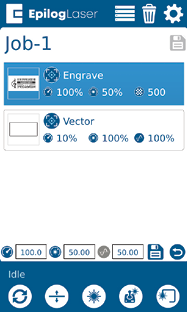
仕事メニュー

スピード

スピード

このアイコンは、選択したジョブの速度設定を示しています。設定範囲は1~100%です。

パワー

パワー

このアイコンは、選択したジョブの電力設定を示しています。設定範囲は1~100%です。

周波数

周波数

このアイコンは、選択したジョブの周波数設定を示しています。設定範囲は1~100%です。

削除ボタン

削除ボタン

「削除」ボタンをクリックすると、ジョブメニューからジョブが完全に削除されます。ジョブを削除するには、ジョブメニューでそのジョブを選択し、「削除」ボタンをクリックしてください。ファイルを削除してもよいか確認するダイアログが表示されます。「はい」を選択すると、そのファイルはジョブメニューから削除されます。

参考情報:

ジョブを「保存済み」としてマークした後、そのファイルを削除しても、ジョブメニューからは削除されます。
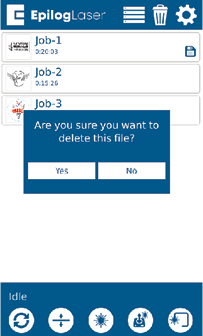
ジョブメニュー - 削除
[参考になる]
  • 日付:
    07/29/2026
/* === Aggressive removal of PrintFriendly injected header elements === */ #printfriendly #pf-title, #printfriendly #pf-src, #printfriendly .pf-header, #printfriendly header, #printfriendly .printfriendly-header, #printfriendly h1:first-of-type, #printfriendly .page-header, #printfriendly [class*="header"], #printfriendly [id*="header"] { display: none !important; visibility: hidden !important; height: 0 !important; margin: 0 !important; padding: 0 !important; } /* Hide any top bar or source URL container */ #printfriendly #pf-src, #printfriendly .pf-src, #printfriendly [class*="src"], #printfriendly [class*="url"] { display: none !important; } /* Force page margins and centered page numbers */ @page { size: letter portrait; margin: 0.7in 0.5in; } @page :left, @page :right { @top-left { content: none !important; } @top-center { content: none !important; } @top-right { content: none !important; } @bottom-center { content: counter(page); font-size: 0.95em; padding-bottom: 25px; } }