メインコンテンツへスキップ
コントロールパネル

フィルター


Getting Started (48)
使用方法および操作 (125)
サービスおよび修理 (270)
Manual (66)

ワイヤレスの有効化/無効化

はじめに

Important Notice for European Customers

This manual describes features that may not be available on all product configurations. Machines shipped to the European Union are supplied with Wi-Fi capabilities disabled and do not support wireless operation in their delivered configuration. Therefore, any instructions related to Wi-Fi setup, connection, or use should be disregarded for EU models.

  1. To enable or disable the Wireless connection option on your machine, first go to the Settings Menu.
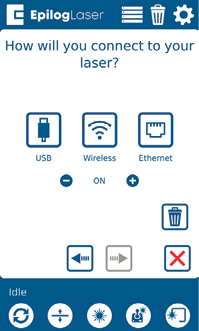
    Network Menu
  2. Under the Settings Menu, select “Network”.

    Network Menu
  3. Press the minus symbol to turn off wireless, and the plus symbol to turn it back on.

  4. Network Menu Note

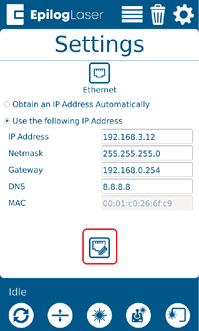
    Ethernet Menu Screenshot

    参考情報:

    If you are already set up with an Ethernet connection and the Network Menu does not display, press the “Ethernet” icon to return to the Network Menu first.

[参考になる]
  • 日付:
    07/29/2026
/* === Aggressive removal of PrintFriendly injected header elements === */ #printfriendly #pf-title, #printfriendly #pf-src, #printfriendly .pf-header, #printfriendly header, #printfriendly .printfriendly-header, #printfriendly h1:first-of-type, #printfriendly .page-header, #printfriendly [class*="header"], #printfriendly [id*="header"] { display: none !important; visibility: hidden !important; height: 0 !important; margin: 0 !important; padding: 0 !important; } /* Hide any top bar or source URL container */ #printfriendly #pf-src, #printfriendly .pf-src, #printfriendly [class*="src"], #printfriendly [class*="url"] { display: none !important; } /* Force page margins and centered page numbers */ @page { size: letter portrait; margin: 0.7in 0.5in; } @page :left, @page :right { @top-left { content: none !important; } @top-center { content: none !important; } @top-right { content: none !important; } @bottom-center { content: counter(page); font-size: 0.95em; padding-bottom: 25px; } }