メインコンテンツへスキップ
コントロールパネル

フィルター


Getting Started (48)
使用方法および操作 (125)
サービスおよび修理 (270)
Manual (66)

設定メニュー

はじめに

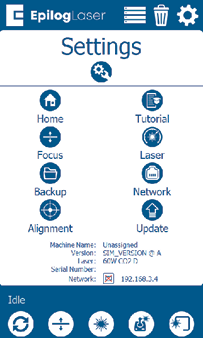
The Settings menu has 8 sub-menus.

ホーム

ホーム

This menu allows you to set an offset to the Home position.


Tutorial Button

Tutorial

This menu allows you to set up your machine. It is the same process as when you set up your laser for the first time, including a demo job to test the machine.
設定メニュー

  • フォーカスボタン

    焦点

    This menu includes options to calibrate the table, CO2 or fiber focus, or the plunger.

  • Laser Icon

    レーザー

    This menu allows you to fine-tune your laser’s settings.

  • Backup Button

    Backup

    This option allows you to backup and restore the machine’s factory settings.

  • Network Button

    ネットワーク

    This menu allows you to set up your machine’s network settings via Ethernet or USB, and by Wi-Fi on machines supplied outside the EU and EEA.

  • Alignment Button

    アライメント

    This menu is used for aligning the laser of the machine.

  • Update Button

    Update

    This menu is used for updating the peripherals of the machine.

[参考になる]
  • 日付:
    08/07/2026
/* === Aggressive removal of PrintFriendly injected header elements === */ #printfriendly #pf-title, #printfriendly #pf-src, #printfriendly .pf-header, #printfriendly header, #printfriendly .printfriendly-header, #printfriendly h1:first-of-type, #printfriendly .page-header, #printfriendly [class*="header"], #printfriendly [id*="header"] { display: none !important; visibility: hidden !important; height: 0 !important; margin: 0 !important; padding: 0 !important; } /* Hide any top bar or source URL container */ #printfriendly #pf-src, #printfriendly .pf-src, #printfriendly [class*="src"], #printfriendly [class*="url"] { display: none !important; } /* Force page margins and centered page numbers */ @page { size: letter portrait; margin: 0.7in 0.5in; } @page :left, @page :right { @top-left { content: none !important; } @top-center { content: none !important; } @top-right { content: none !important; } @bottom-center { content: counter(page); font-size: 0.95em; padding-bottom: 25px; } }