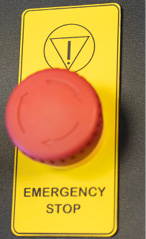
Fusion Ascentの全モデルの上部には、大きな赤い緊急停止ボタンがあります。火災などの緊急事態が発生した場合は、直ちにこの緊急停止ボタンを押してください。レーザーキャリッジが直ちに停止し、システムがシャットダウンします。
Fusion Ascentのシステムをリセットするには、キースイッチを使用してシステムの電源を切り、次に緊急停止ボタンを時計回りに回してシステムを解除し、その後レーザーの電源を入れる必要があります。
After an emergency stop, a normal stop, or an interruption of the power supply, the laser system will not resume a job automatically. Restarting a job always requires deliberate operator action (pressing Go/Stop).
When power is applied, the system performs a homing sequence to establish axis positions. The worktable first moves downward to locate its home switch and then returns to its previous height, and the carriage moves to its home position. Keep hands clear of the worktable and the carriage when switching the machine on, and never switch the machine on while any part of your body is inside the cabinet.
参考情報:
万が一、レーザーが動作を停止し、電源が入らなくなった場合は、誤って非常停止ボタンが押されていないか確認してください。
警告:
IF A HAND OR FINGER IS TRAPPED BY THE WORKTABLE:
DO NOT PRESS THE EMERGENCY STOP BUTTON. Doing so removes power to the drive motors, and the worktable CANNOT then be moved until the system has been reset.
- RELEASE THE JOYSTICK. Worktable movement stops.
- PULL THE JOYSTICK DOWNWARD. The worktable moves down and releases.
- IF THE EMERGENCY STOP BUTTON HAS ALREADY BEEN PRESSED, RESET THE SYSTEM FIRST: turn the machine off at the Key Switch, twist the Emergency Stop Button clockwise to release it, then turn the machine back on. The worktable can then be driven down with the joystick.
- SEEK MEDICAL ATTENTION for any crush injury, even where there is no visible wound.