メインコンテンツへスキップ
システムの特長
19000

フィルター


はじめに (8)
Usage and Operation (9)
Service and Repair (12)
マニュアル (62)

IRIS™ カメラ位置決めシステム

はじめに

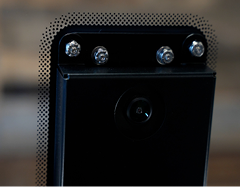
Fusion Ascentには、IRIS™カメラ位置決めシステムが搭載されており、数秒でアートワークをスクリーン上に正確に配置することができます。上部に取り付けられたカメラが作業エリアのライブ映像を映し出し、アートワークを正確に配置できるようにするとともに、レンズに設置されたカメラにより、あらかじめ印刷された見当マークをシステムが検出します。

お使いの機械のモデルによって、上部カメラが1台または2台搭載されています。

IRISカメラ位置決めシステム

IRIS™ カメラの使用方法

プロジェクトのライブプレビューは、Epilogダッシュボードの「プレビュー」タブから確認できます。IRIS™カメラ位置決めシステムは、以下の条件下で最も正確な結果を提供します:

  • 切断または彫刻の対象となるワークピースは、カメラの真下に配置され、そして
  • テーブルのフォーカスは作品に合わせられています。テーブル上で作品にフォーカスが合っていない場合、ダッシュボードのライブプレビューでアートワークが正しく配置されない可能性があります。

また、精度を高めるためにカメラのキャリブレーションを行うこともできます。詳細については、「キャリブレーション」を参照してください。

参考情報:

Epilogダッシュボードのライブプレビューを使用するには、本機の上部ドアを完全に閉める必要があります。

[参考になる]
  • 日付:
    07/28/2026

レーザー治療の旅を続けましょう

過去のレッスンを復習するか、次の内容に進んでみましょう。
/* === Aggressive removal of PrintFriendly injected header elements === */ #printfriendly #pf-title, #printfriendly #pf-src, #printfriendly .pf-header, #printfriendly header, #printfriendly .printfriendly-header, #printfriendly h1:first-of-type, #printfriendly .page-header, #printfriendly [class*="header"], #printfriendly [id*="header"] { display: none !important; visibility: hidden !important; height: 0 !important; margin: 0 !important; padding: 0 !important; } /* Hide any top bar or source URL container */ #printfriendly #pf-src, #printfriendly .pf-src, #printfriendly [class*="src"], #printfriendly [class*="url"] { display: none !important; } /* Force page margins and centered page numbers */ @page { size: letter portrait; margin: 0.7in 0.5in; } @page :left, @page :right { @top-left { content: none !important; } @top-center { content: none !important; } @top-right { content: none !important; } @bottom-center { content: counter(page); font-size: 0.95em; padding-bottom: 25px; } }