Control Panel

Filters


Getting Started (48)
Usage and Operation (125)
Service and Repair (270)
Manual (66)

Advanced Settings

Introduction

Access the Advanced Settings Menu by first going to the Settings Menu, then long pressing the text “Settings” at the top of the screen.

In this menu you have options for calibrating various parts of the machine, including the Joystick, Cameras and Auto Focus. Each option provides step by step instructions for each process.

For more information about Camera Calibration, see “Camera Calibration”.

For more information about Auto Focus Calibration, see “Calibrating the Auto Focus”.
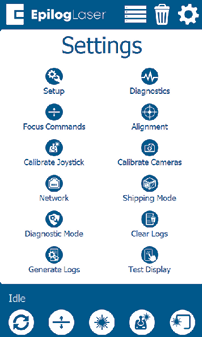
Advanced Settings Menu
[helpful]
  • Date:
    07/30/2026
/* === Aggressive removal of PrintFriendly injected header elements === */ #printfriendly #pf-title, #printfriendly #pf-src, #printfriendly .pf-header, #printfriendly header, #printfriendly .printfriendly-header, #printfriendly h1:first-of-type, #printfriendly .page-header, #printfriendly [class*="header"], #printfriendly [id*="header"] { display: none !important; visibility: hidden !important; height: 0 !important; margin: 0 !important; padding: 0 !important; } /* Hide any top bar or source URL container */ #printfriendly #pf-src, #printfriendly .pf-src, #printfriendly [class*="src"], #printfriendly [class*="url"] { display: none !important; } /* Force page margins and centered page numbers */ @page { size: letter portrait; margin: 0.7in 0.5in; } @page :left, @page :right { @top-left { content: none !important; } @top-center { content: none !important; } @top-right { content: none !important; } @bottom-center { content: counter(page); font-size: 0.95em; padding-bottom: 25px; } }