System Features

Filters


Getting Started (48)
Usage and Operation (125)
Service and Repair (270)
Manual (66)

Touch Screen

Introduction

The Fusion Ascent is controlled by a 7” capacitive resolution touch screen. This feature allows you to select between jobs, change settings, and more. For more information on how to use the touch screen, see “CONTROL PANEL”.
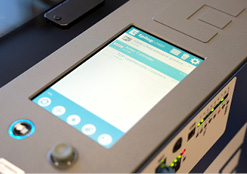
Fusion Ascent Touch Screen
[helpful]
  • Date:
    07/29/2026
/* === Aggressive removal of PrintFriendly injected header elements === */ #printfriendly #pf-title, #printfriendly #pf-src, #printfriendly .pf-header, #printfriendly header, #printfriendly .printfriendly-header, #printfriendly h1:first-of-type, #printfriendly .page-header, #printfriendly [class*="header"], #printfriendly [id*="header"] { display: none !important; visibility: hidden !important; height: 0 !important; margin: 0 !important; padding: 0 !important; } /* Hide any top bar or source URL container */ #printfriendly #pf-src, #printfriendly .pf-src, #printfriendly [class*="src"], #printfriendly [class*="url"] { display: none !important; } /* Force page margins and centered page numbers */ @page { size: letter portrait; margin: 0.7in 0.5in; } @page :left, @page :right { @top-left { content: none !important; } @top-center { content: none !important; } @top-right { content: none !important; } @bottom-center { content: counter(page); font-size: 0.95em; padding-bottom: 25px; } }