Calibration
19000

Filters


Getting Started (8)
Usage and Operation (9)
Service and Repair (12)
Manual (62)

Carriage Camera Calibration

Introduction

The following procedure must be performed first for all Fusion Ascent machines. Turn on the engraver, and let it complete the startup process.

  1. On the display, press the gear icon to enter the Settings Menu.
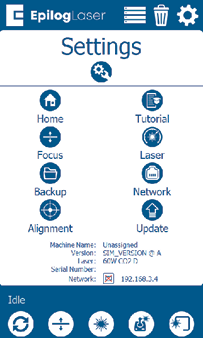
    Settings menu
  2. Long Press the “Settings” text for 2-3 seconds to enter the Advanced Settings Menu.
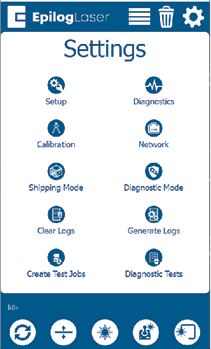
    Advanced settings menu

  1. Click on “Calibration” followed by “Calibrate Cameras” to enter the Camera Calibration menu. If using 1.1.2.8 or older, just tap “Calibrate Cameras”.
  2. Place an 8” x 5” (200mm x 125mm) piece of anodized aluminum in the top left corner of the table.
  3. Close the top door of the engraver.
  4. Press OK to begin the carriage camera calibration and the engraver will move the table to the appropriate focal height for calibration.
  5. The engraver will mark the anodized aluminum with a pattern that the carriage camera analyzes for calibration. Once the job is complete, a success message should appear.
  6. Follow the on-screen prompts to continue to the overhead camera calibration.
[helpful]
  • Date:
    08/10/2026

Continue Your Laser Journey

Revisit a past lesson or move ahead to discover what's next.
/* === Aggressive removal of PrintFriendly injected header elements === */ #printfriendly #pf-title, #printfriendly #pf-src, #printfriendly .pf-header, #printfriendly header, #printfriendly .printfriendly-header, #printfriendly h1:first-of-type, #printfriendly .page-header, #printfriendly [class*="header"], #printfriendly [id*="header"] { display: none !important; visibility: hidden !important; height: 0 !important; margin: 0 !important; padding: 0 !important; } /* Hide any top bar or source URL container */ #printfriendly #pf-src, #printfriendly .pf-src, #printfriendly [class*="src"], #printfriendly [class*="url"] { display: none !important; } /* Force page margins and centered page numbers */ @page { size: letter portrait; margin: 0.7in 0.5in; } @page :left, @page :right { @top-left { content: none !important; } @top-center { content: none !important; } @top-right { content: none !important; } @bottom-center { content: counter(page); font-size: 0.95em; padding-bottom: 25px; } }