System Features
19000

Filters


Getting Started (8)
Usage and Operation (9)
Service and Repair (12)
Manual (62)

Laser Emission Indicators

Introduction

The Ascent has two emission indicators: one located in the Key Switch and E-Stop cluster above the LC1000 main controller board, and a second located on the side of the backplane board. Both indicators are red and illuminate when the laser is capable of firing.

During Class 4 operation, these indicators are required to alert users that a laser beam may be present. Refer to the Class 4 manual for additional information about Class 4 operation and safety requirements.

In a Class 2 configuration, the emission indicator remains illuminated whenever the doors are closed and all safety interlocks are engaged. This is due to the CO₂ laser tickle signal, which keeps the laser in a ready state.
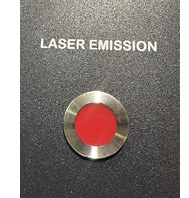
Fusion Ascent Status Light
[helpful]
  • Date:
    08/06/2026

Continue Your Laser Journey

Revisit a past lesson or move ahead to discover what's next.
/* === Aggressive removal of PrintFriendly injected header elements === */ #printfriendly #pf-title, #printfriendly #pf-src, #printfriendly .pf-header, #printfriendly header, #printfriendly .printfriendly-header, #printfriendly h1:first-of-type, #printfriendly .page-header, #printfriendly [class*="header"], #printfriendly [id*="header"] { display: none !important; visibility: hidden !important; height: 0 !important; margin: 0 !important; padding: 0 !important; } /* Hide any top bar or source URL container */ #printfriendly #pf-src, #printfriendly .pf-src, #printfriendly [class*="src"], #printfriendly [class*="url"] { display: none !important; } /* Force page margins and centered page numbers */ @page { size: letter portrait; margin: 0.7in 0.5in; } @page :left, @page :right { @top-left { content: none !important; } @top-center { content: none !important; } @top-right { content: none !important; } @bottom-center { content: counter(page); font-size: 0.95em; padding-bottom: 25px; } }