メインコンテンツへスキップ

CO2 の微刺激設定

くすぐり設定とは何ですか?また、どのように調整できますか?

はじめに

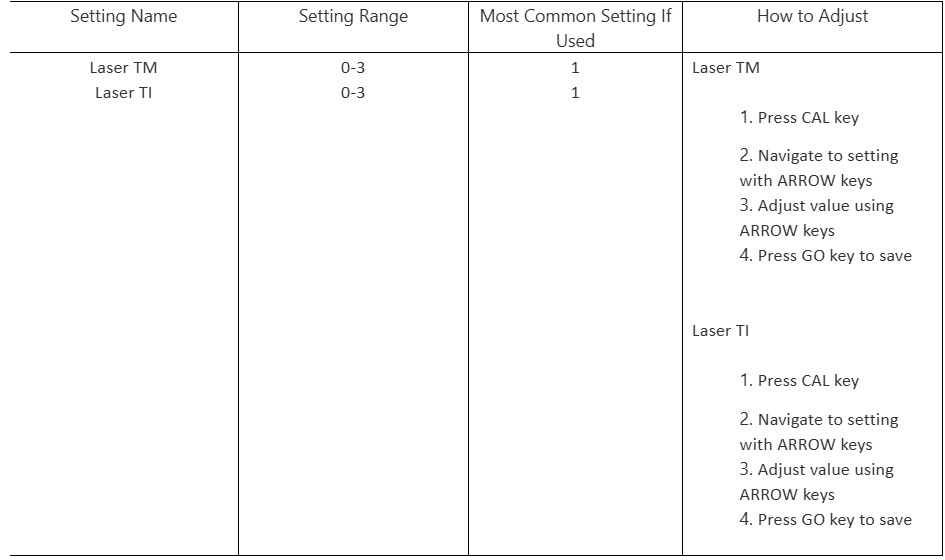
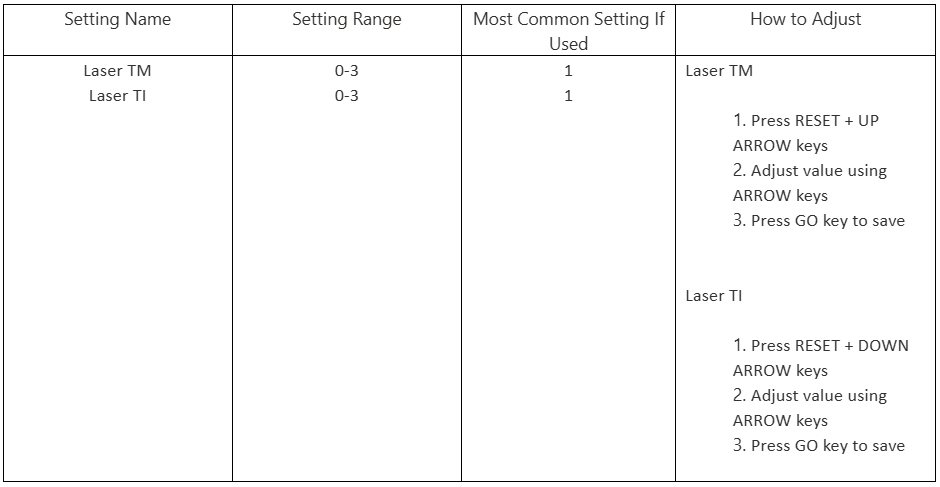
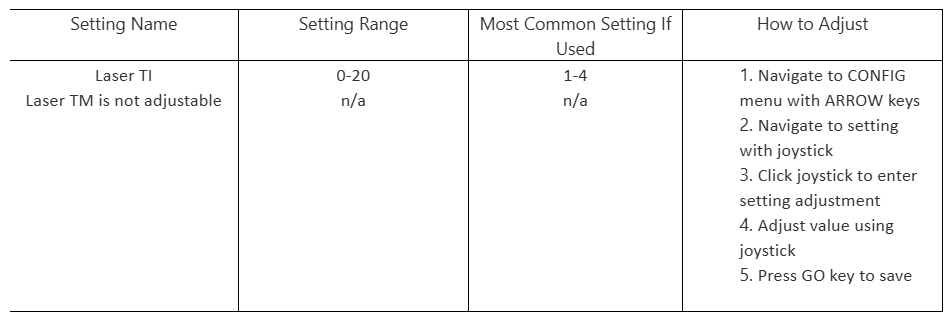
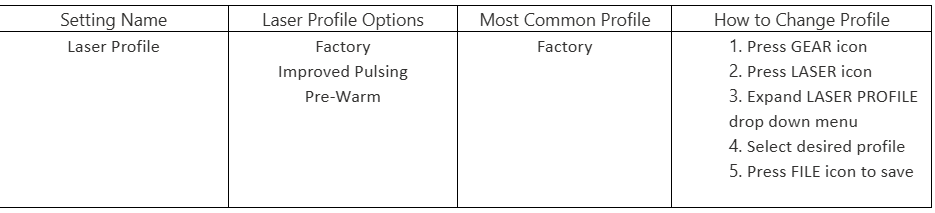
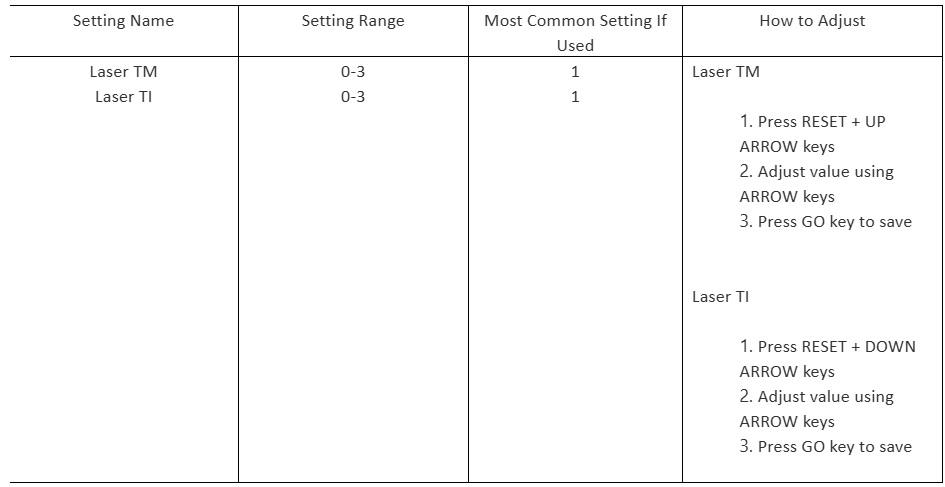
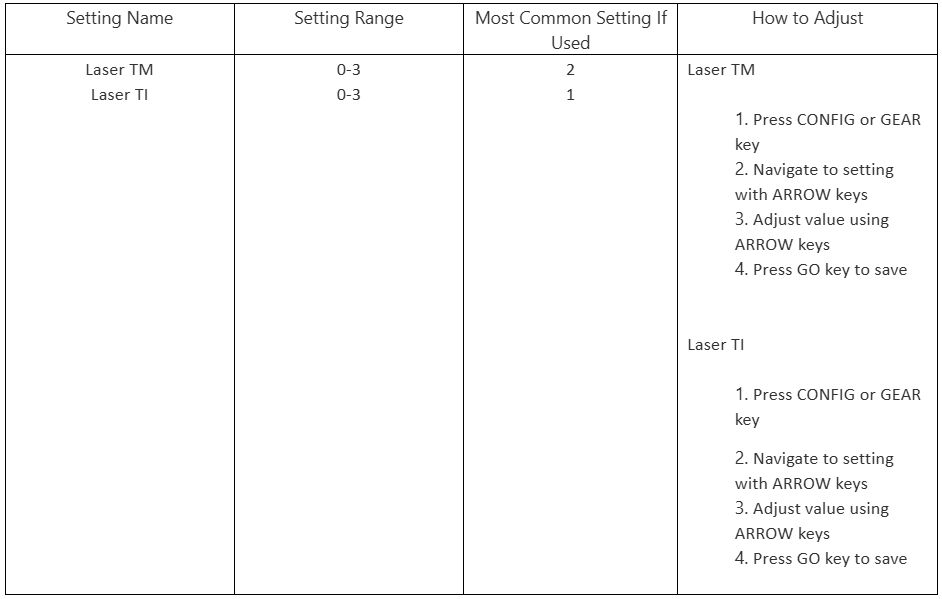
エピログHelix 導入されたレーザータックル設定により、ユーザーはレーザー管に送られる高周波(RF)信号を調整することで、CO2 特定の特性をカスタマイズできます。RF信号の役割は、CO2 管内のガス混合気を励起・活性化させ、それによってlaser beamを生成・放電させることです。 RF信号の特定特性を変更することで、laser beam特性も変更可能です。CO2 調整することで、レーザーの応答性を向上させたり、休止後のレーザー管のウォームアップ時間を短縮したりできます。タックル設定はレーザーに信号が届くことで効果を発揮するため、すべてのインターロックドアとパネルは閉じた状態である必要があります。

古い彫刻機では、ティクル設定は通常TMとTIという2つの異なる設定として表示されます。TM(ティクルモード)はティクル設定が有効となる時間長を表し、0がオフ、3が常時有効です。TI(ティクル強度)はティクル設定の周波数を表し、0がオフ、3が最高周波数です。 レーザーのティクル設定を調整する際は、まず選択した値を1ずつ上げながら彫刻機の動作を確認してください。レーザーのティクル設定が高すぎると、彫刻機がアイドル状態でもレーザー管から不要な発光が生じる可能性があります。
[helpful]
  • ID:
    KA-01541
  • 日付:
    2025年4月2日

レーザー治療の旅を続けましょう

過去のレッスンを復習するか、次のステップに進んで新たな発見を!
/* === Aggressive removal of PrintFriendly injected header elements === */ #printfriendly #pf-title, #printfriendly #pf-src, #printfriendly .pf-header, #printfriendly header, #printfriendly .printfriendly-header, #printfriendly h1:first-of-type, #printfriendly .page-header, #printfriendly [class*="header"], #printfriendly [id*="header"] { display: none !important; visibility: hidden !important; height: 0 !important; margin: 0 !important; padding: 0 !important; } /* Hide any top bar or source URL container */ #printfriendly #pf-src, #printfriendly .pf-src, #printfriendly [class*="src"], #printfriendly [class*="url"] { display: none !important; } /* Force page margins and centered page numbers */ @page { size: letter portrait; margin: 0.7in 0.5in; } @page :left, @page :right { @top-left { content: none !important; } @top-center { content: none !important; } @top-right { content: none !important; } @bottom-center { content: counter(page); font-size: 0.95em; padding-bottom: 25px; } }