目次
- はじめに
- 安全
- はじめに
- Setting Up Your Laser System
- Unpacking the Fusion Ascent
- Choose Where to Locate the System
- Connecting the Exhaust
- Connecting Electrical Power
- Connecting the Laser to Your Computer
- Power on the Laser
- Set the IP Address
- Install the Software Suite & Set Up Your Laser
- Sign Up for Driver Updates and Register Your System
- コントロールパネル
- System Features
- Machine Maintenance
- Specifications
- Technical Support
- Warranty
- マテリアル設定
- Calibration
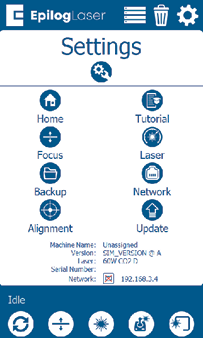
設定メニュー
The Settings menu has 8 sub-menus.
ホーム
This menu allows you to set an offset to the Home position.
Tutorial
This menu allows you to set up your machine. It is the same process as when you set up your laser for the first time, including a demo job to test the machine.
焦点
This menu includes options to calibrate the table, CO2 or fiber focus, or the plunger.
レーザー
This menu allows you to fine-tune your laser’s settings.
Backup
This option allows you to backup and restore the machine’s factory settings.
Network
This menu allows you to set up your machine’s network settings via Ethernet, Wifi or USB.
アライメント
This menu is used for aligning the laser of the machine.
Program
This menu is used for updating the peripherals of the machine.