Control Panel
19000

Filters


Getting Started (8)
Usage and Operation (9)
Service and Repair (12)
Manual (62)

Configuration Menu

Introduction

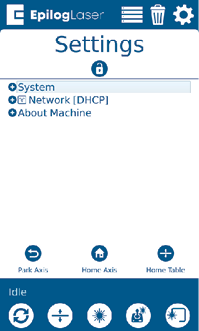
The Configuration menu has three sub-menus: System, Network, and About Machine.

System

Once selected, the System Settings display detailed information about the machine. These are factory settings that should not be changed unless instructed by Epilog Technical Support.

Network

Once selected, the Network Settings allow you to change the IP Address and the Netmask. The IP Address on this screen should match the IP Address you have assigned your machine in the Job Manager. If you have multiple machines, each one will need its own IP Address.

About Machine

Once selected, this section displays info about your laser’s firmware version, laser power, and Serial Number.

Park Axis

Pressing Park Axis returns the Laser to the Home Position.
Park Axis
[helpful]
  • Date:
    07/30/2026

Continue Your Laser Journey

Revisit a past lesson or move ahead to discover what's next.
/* === Aggressive removal of PrintFriendly injected header elements === */ #printfriendly #pf-title, #printfriendly #pf-src, #printfriendly .pf-header, #printfriendly header, #printfriendly .printfriendly-header, #printfriendly h1:first-of-type, #printfriendly .page-header, #printfriendly [class*="header"], #printfriendly [id*="header"] { display: none !important; visibility: hidden !important; height: 0 !important; margin: 0 !important; padding: 0 !important; } /* Hide any top bar or source URL container */ #printfriendly #pf-src, #printfriendly .pf-src, #printfriendly [class*="src"], #printfriendly [class*="url"] { display: none !important; } /* Force page margins and centered page numbers */ @page { size: letter portrait; margin: 0.7in 0.5in; } @page :left, @page :right { @top-left { content: none !important; } @top-center { content: none !important; } @top-right { content: none !important; } @bottom-center { content: counter(page); font-size: 0.95em; padding-bottom: 25px; } }