Índice
- Introducción
- Seguridad
- Introducción
- Setting Up Your Laser System
- Unpacking the Fusion Ascent
- Choose Where to Locate the System
- Connecting the Exhaust
- Connecting Electrical Power
- Connecting the Laser to Your Computer
- Power on the Laser
- Set the IP Address
- Install the Software Suite & Set Up Your Laser
- Sign Up for Driver Updates and Register Your System
- Panel de control
- System Features
- Machine Maintenance
- Specifications
- Technical Support
- Warranty
- Configuración de materiales
- Calibration
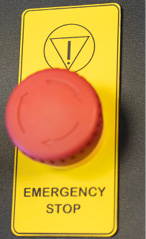
Emergency Stop Button
On the top of all Fusion Ascent models, you will see a large, red Emergency Stop Button. If there is an emergency, such as a fire, immediately press the Emergency Stop Button. The laser carriage will immediately stop and the system will shut down.
To reset the system on the Fusion Ascent, you must turn off the system using the Key Switch, then twist the Emergency Stop Button clockwise to release the system, then turn on the laser.
After an emergency stop, a normal stop, or an interruption of the power supply, the laser system will not restart automatically. Restarting always requires deliberate operator action (pressing Go/Stop). The machine does not resume operation on its own when power is restored.
If your laser ever stops running and you can’t turn it on, check to see if the Emergency Stop Button has been pressed by accident.