Inhoudsopgave
- Inleiding
- Veiligheid
- Aan de slag
- Setting Up Your Laser System
- Unpacking the Fusion Ascent
- Choose Where to Locate the System
- Connecting the Exhaust
- Connecting Electrical Power
- Connecting the Laser to Your Computer
- Power on the Laser
- Set the IP Address
- Install the Software Suite & Set Up Your Laser
- Sign Up for Driver Updates and Register Your System
- Configuratiescherm
- System Features
- Machine Maintenance
- Specifications
- Technical Support
- Warranty
- Materiaal instellingen
- Calibration
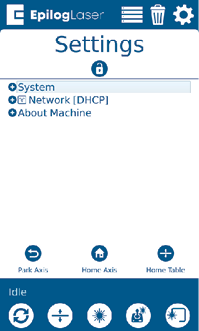
Configuratiemenu
The Configuration menu has three sub-menus: System, Network, and About Machine.
System
Once selected, the System Settings display detailed information about the machine. These are factory settings that should not be changed unless instructed by Epilog Technical Support.
Network
Once selected, the Network Settings allow you to change the IP Address and the Netmask. The IP Address on this screen should match the IP Address you have assigned your machine in the Job Manager. If you have multiple machines, each one will need its own IP Address.
About Machine
Once selected, this section displays info about your laser’s firmware version, laser power, and Serial Number.
Park Axis
Pressing Park Axis returns the Laser to the Home Position.