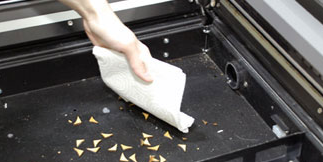
This article will guide you through recommendations to reduce fire hazard with your laser. Your laser system uses a high intensity beam of light that can generate extremely high temperatures when it comes into contact with the material being engraved, marked or cut. Some materials are extremely flammable and can (...)
Make Your Own FontBot
What is a FontBot? It’s a design you create from the letters and characters of a specific font. Designers have come up with all kinds of amazing robots and other creations using fonts, but what will yours look like? We’ll be giving a quick demonstration on how to create your (...)
Everything You Wanted to Know about Fonts…and Then Some!
Regardless of your design program, you’re likely faced with a myriad of fonts to select from when you’re creating a design. But how do you choose fonts? What types of fonts go with what kind of designs? How can you manipulate text and fonts to create appealing visuals? Read on (...)
Creating a 3D Effect With the Laser on Acrylic and Glass
1) This 3D effect will work for any block style font and many other types of shapes, but for this exercise we are going to apply the effect to the letter “E”. Start with a capital letter “E” to the specifications below. Font: Arial Black Size: 310 pt Convert to (...)
Layering a Clip Art Image
In our 3D acrylic Sample Club download, we engraved parts of a clip art image on five cut pieces of acrylic. When placed together, the engraved acrylic creates a 3D effect because of the different levels of each engraving. In this article we’re going to show you how you can (...)
Using What the Font to Identify Fonts
Have you ever received an engraving file without the font files included or the fonts are in a bitmap format? Every engraver knows the frustration of trying to match up a font to the sample that you receive from a customer. Corel has a new feature that will allow you (...)
Duplicating Around a Center Point in CorelDRAW
The Duplicate tool in CorelDRAW is one of our favorite features because it allows us to quickly design many of our laser projects. For certain projects, we often customize the Duplicate tool to copy a design and rotate it around a specific point on the page. This is helpful when (...)
Printing Mulitple Items with CorelDRAW’s Imposition Layout Feature
Corel’s Imposition Layout feature was designed so that you can print more than one page of a document on a single sheet of paper. This is a handy feature when creating magazines, manuals and other multi-page documents. We’re going to use this same tool to engrave several plaques to fill (...)
Print Merge in CorelDRAW
In our last discussion of Imposition Layout (see related articles), we showed you how to use CorelDRAW’s Imposition Layout feature to engrave several plaques to fill the engraving table without having to duplicate the image. Now we’re going to take this concept to the next level and add in the (...)
Removing the Background from a Photo
Anyone who has engraved photographs has had the experience of someone bringing in a photograph with a dark background that has no contrast with the person that is in the picture. While you can fix a lot of the problems with software like Photograv, to really make the photo stand (...)
Creating a Multiple Name Badge Layout using Print Merge
One of the most common questions we receive is regarding name badge layout. Although it looks easy, finding a quick way to create multiple name badges can create some major complications. Since working with PhotoLaser Plus, we’ve discovered a great benefit of the software is that it does an excellent (...)
Design Tips for Non-Designers
Depending on the engraving services you provide and how you operate your business, you may be required to produce different designs, either for your own sample purposes or when completing jobs for customers. This can make even the best engravers a little nervous – especially those who don’t necessarily consider (...)