Table des matières
- Introduction
- Sécurité
- Pour commencer
- Setting Up Your Laser System
- Unpacking the Fusion Ascent
- Choose Where to Locate the System
- Connecting the Exhaust
- Connecting Electrical Power
- Connecting the Laser to Your Computer
- Power on the Laser
- Set the IP Address
- Install the Software Suite & Set Up Your Laser
- Sign Up for Driver Updates and Register Your System
- Panneau de configuration
- System Features
- Machine Maintenance
- Specifications
- Technical Support
- Warranty
- Paramètres matériels
- Calibration
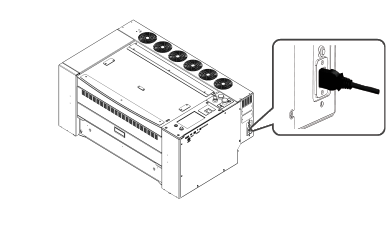
Connecting Electrical Power
Epilog supplies the appropriate power cord for the system you ordered. The power cord is found in the accessory package with your machine.
The power cord for the laser plugs into the power receptacle located on the right side of the machine in the rear corner. It is recommended that a dedicated 15-amp circuit be used if available.
All equipped machines, regardless of model, can run on 100V or 220V with a 15 amp outlet. The plug type for 110V is NEMA 5-15P (for wall receptacle NEMA 5-15R).
For more information, see the “Electrical Safety”.