Estimated time: 20–30 minutes • Skill: Intermediate
This procedure will guide you through the process of removing and installing the laser assembly in your Epilog Zing 16 laser system. Following these steps ensures proper alignment, secure mounting, and optimal performance of your engraving system.
Laser Removal
-
Power down and disconnect the machine.
Turn off the engraver and unplug it from the power source. -
Remove the left-hand side panel.
Remove the four Phillips screws securing the side panel: three on the side and one on the rear.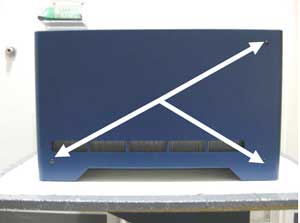
Image 1: Side panel screws (side view).
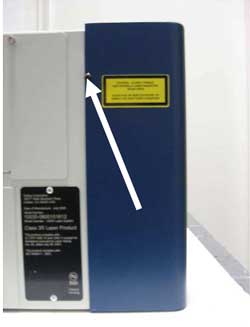
Image 2: Side panel screw (rear view).
-
Disconnect the laser power harness.
Located above and behind the laser assembly, press the lock and pull the connector toward you to disconnect.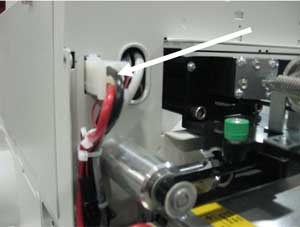
Image 3: Laser power harness.
-
Disconnect the data cable.
Press the locking tab and remove the data cable from the laser assembly.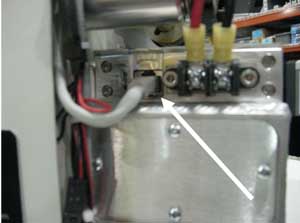
Image 4: Laser data cable.
-
Remove the laser mounting plates.
The laser is held by two green mounting plates inside the engraving area on the left side. Loosen the four outer screws (Picture 5a) but do not remove the inner guide screw (Picture 5b). The screws will pop slightly but remain attached to the mount.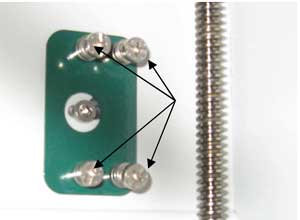
Image 5: Outer screws on mounting plates.
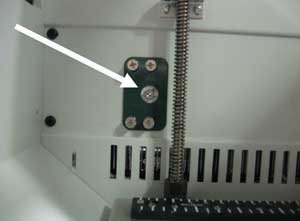
Image 6: Inner guide screw.
-
Remove the laser assembly.
Lift slightly and align the guide pin with the slot in the chassis. Slide the laser assembly toward the front and remove it from the machine.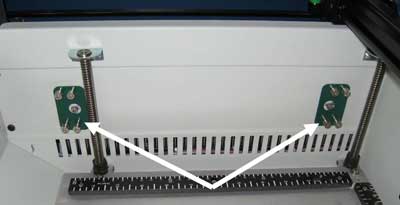
Image 7: Laser mounting plate location.
Laser Installation
-
Install the laser assembly.
Align the guide pins with the chassis holes, push the assembly against the side, and slide it forward until seated. -
Install the mounting plates.
Loosely install the four screws on each mounting plate. Once all screws are in place, tighten all eight screws securely. -
Reconnect the data cable.
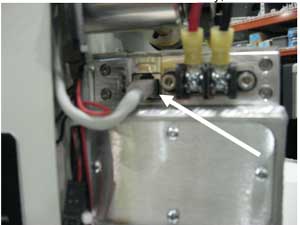
Image 8: Data cable reconnected.
-
Reconnect the power harness.
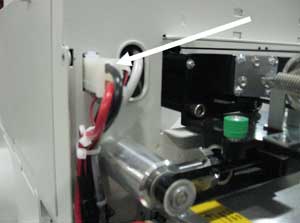
Image 9: Power harness reconnected.
-
Perform laser alignment.
After installation, perform a full laser alignment as described in the Epilog Technical Note: Zing Laser Alignment.