Table of Contents
- Introduction
- Safety
- Getting Started
- Setting Up Your Laser System
- Unpacking the Fusion Ascent
- Choose Where to Locate the System
- Connecting the Exhaust
- Connecting Electrical Power
- Connecting the Laser to Your Computer
- Power on the Laser
- Set the IP Address
- Install the Software Suite & Set Up Your Laser
- Sign Up for Driver Updates and Register Your System
- Control Panel
- System Features
- Machine Maintenance
- Specifications
- Technical Support
- Warranty
- Material Settings
- Calibration
Camera Calibration

Important Notes:
- All focus calibration procedures must be completed before performing a camera calibration to ensure accurate results.
- Camera calibration is only necessary if recommended by Epilog’s Technical Support.
- Before beginning, reboot your machine if you have recently run any jobs.
- An official Epilog Calibration Mat is necessary for the Overhead Camera process.
- If the mat is curled, allow it to sit on a flat surface until it is perfectly flat. An unrolled, flat mat is essential for accurate results.
- It is advised to remove the calibration mat from the cardboard tube it is shipped in and laying it checkerboard side down on a flat surface at least an hour before completing the camera calibration. This ensures that the calibration mat will lay flat in the engraver and will result in a more accurate camera calibration.
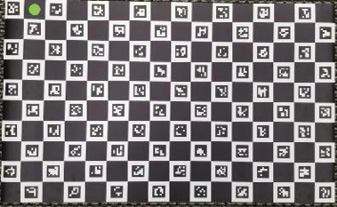
Camera Calibration Mat